
Campaigns & feedback · Plus and Pro
Salon marketing that brings clients back while you work
Switch on the automatic messages you want, send a campaign to exactly the right clients, and see who came back within 30 days. Every message respects consent, quiet hours and a limit of one offer a week, so your clients never feel spammed.
- Birthday, next visit due and we miss you, sent for you
- Campaigns to a group, with a preview before sending
- Private feedback, and an alert when someone is unhappy
Automatic messages
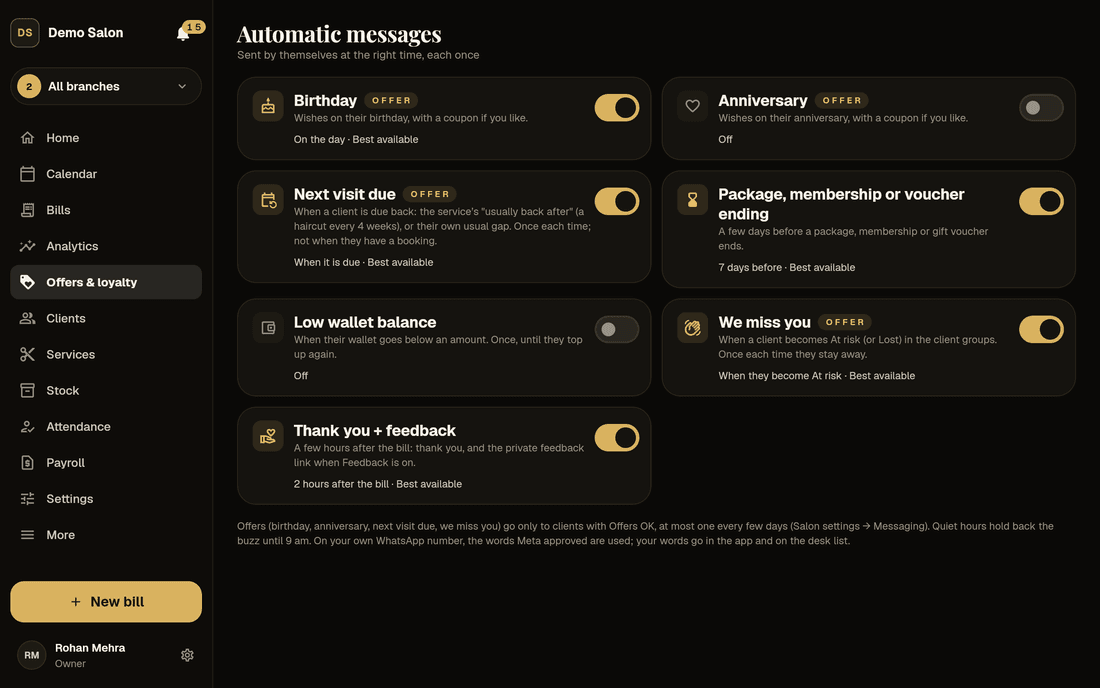
Seven automatic messages that keep clients coming back
Each message is a card with an on/off switch and how many went in the last 30 days. Open one to change the words (placeholders like {name} and {salon} are filled in for each client), preview it, choose how it goes and set the timing. Birthday, anniversary and we-miss-you messages can carry a personal one-time coupon.
| Message | When it goes | To start |
|---|---|---|
| Birthday | On the day, or 1–7 days before, at 10:30 am | Off |
| Anniversary | The same as the birthday | Off |
| Next visit due | When the client is due back, from each service’s “Usually back after” or their own usual gap; not if they already have a booking | Off |
| Package, membership or voucher ending | 1–30 days before it ends (7 to start) | On |
| Low wallet balance | When the wallet drops below an amount (₹200 to start), for clients who have topped up | Off |
| We miss you | When a client becomes At risk, or only once Lost if you prefer | Off |
| Thank you + feedback | 1–48 hours after the bill (2 to start), with the private feedback link | Off |
Birthday, anniversary, next visit due and we miss you are offers, so they go only to clients who said yes to offers. Each message goes once: a job running twice never sends it twice.
Campaigns
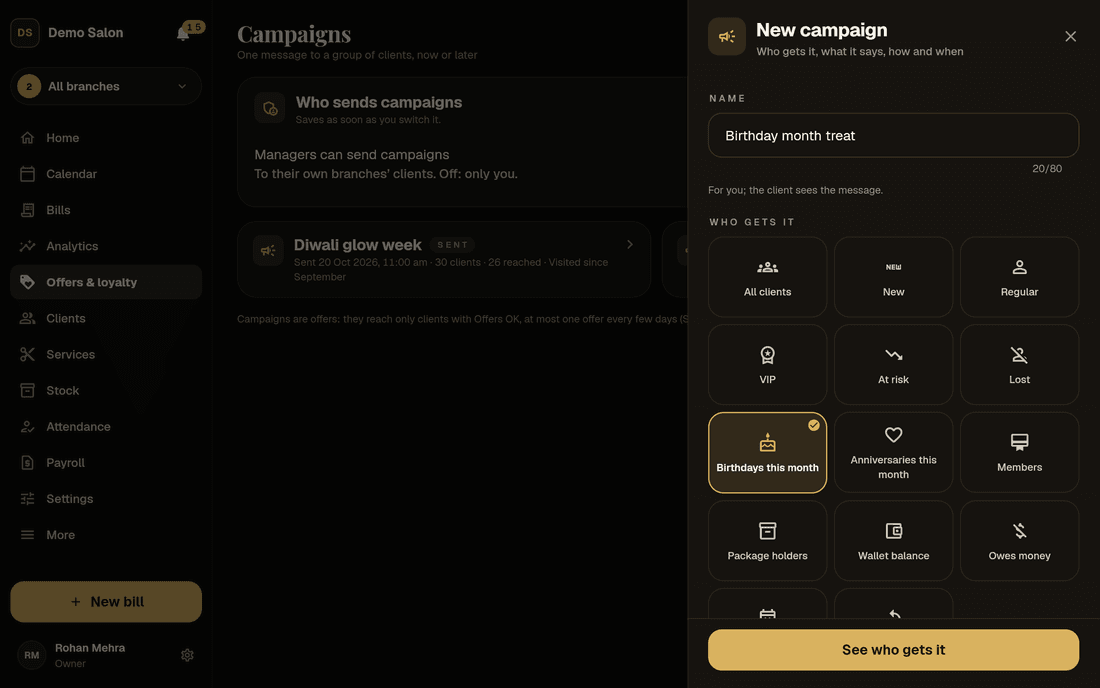
A campaign to the right clients in five minutes
Pick who gets it: a client group (New, Regular, VIP, At risk, Lost, Win back, Birthdays this month…), narrowed with any Clients filter such as last visit, spend, services, stylist or membership, and the branches. Use ready words (Offer, We miss you, Festival) or your own, and add a personal one-time coupon if you like.
Choose how it goes (best available, app, WhatsApp or the desk list) and when: now, or scheduled up to 60 days ahead. Before anything goes you see exactly who gets it and how, such as “312 clients: 120 by app, 150 by WhatsApp, 42 on the desk list”, with how many won’t get it and why. Then slide to send.
- Groups plus every Clients filter
- A preview of who gets it, and who doesn’t
- Scheduled campaigns can be cancelled until they start
Results
See who came back, not just who it reached
Each campaign has its own page. The delivery report shows what was sent, delivered, read, waiting, failed or not sent, by app, WhatsApp and the desk list, with the reasons.
The results count the clients it reached who came in for a bill within 30 days, how many bills that was, what they came to after refunds, and which coupons were used. A table lists who came back.
The sums are simple and honest: a client who came back after two campaigns counts for both, and there is no comparison group. Treat it as a good guide, not a laboratory result.
- Sent, delivered, read and failed
- Came back within 30 days, with bills and money
- Coupons used, and what they took off
Sample results
Screens
Messages, campaigns and feedback in Frizzi
Real Frizzi screens on sample data. Tap one to see it larger.
Consent and costs
Marketing your clients won’t mind getting
Only clients who said yes
“OK to send offers” stays off until the client agrees, at the desk, on the sign-up tablet or in the app. A client who turns offers off in the Frizzi app gets none from any salon.
One offer a week, quiet at night
Each client gets at most one offer every 7 days (or 3, 14 or 30, your choice). Between 9 pm and 9 am, offers wait silently until morning.
App first, then WhatsApp, then the desk
Messages go free in the Frizzi app (coming soon) when the client has it. Automatic WhatsApp needs your own WhatsApp Business number connected; otherwise the desk list lets reception tap to send from any WhatsApp.
What WhatsApp costs
Your plan’s free WhatsApp messages are for reminders and updates. Promotional messages through Frizzi need the promotional pack: 500 for ₹599 plus GST. Messages from your own number are billed to you by Meta and use neither.
Private feedback
Hear what clients really think, in private
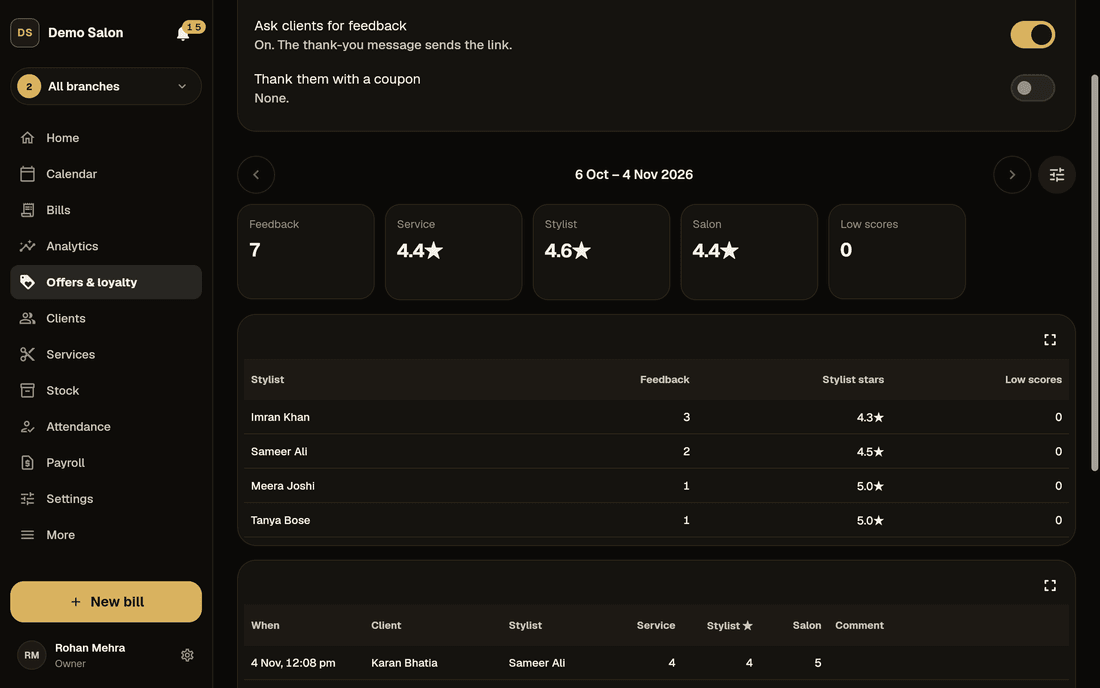
Switch on feedback and the thank-you message carries a link. The client gives stars for the service, the stylist and the salon, with a comment if they like, up to 30 days after the visit; one per visit.
Without the Frizzi app it opens as a simple web page, no login needed; with the app it opens inside it. Or hand over the feedback tablet at the desk: the client types their number, their visit comes up (“Hi Raj! Haircut with Imran”) and they tap the stars. Closing the tablet needs an owner’s or manager’s PIN.
None of this is public. It is separate from the ratings and reviews clients leave in the app. You can thank clients for their feedback with a one-time coupon.
- Service, stylist and salon, each out of 5
- A web link, the app or the desk tablet
- Averages and a by-stylist report
Unhappy clients
Call an unhappy client before they tell anyone else
An alert at once
Any 1 or 2 star score reaches the owner straight away under the bell: “Unhappy client: Om Prakash”, with the stars and the comment.
A list to call
“Unhappy clients to call” lists low scores not yet called back, with a call button. Tap Called and add a note, so everyone knows it’s handled.
By stylist
The feedback count, average stylist stars and low scores for each person, so a training need shows up as a pattern, not a rumour.
How it works
From switched off to sending in four steps
Choose how to reach clients
In Salon settings → Messaging: the Frizzi app, WhatsApp, the desk list, quiet hours and the offer limit.
Switch on automatic messages
Birthday, next visit due, we miss you: check the words, preview, switch on.
Send your first campaign
Pick a group, write the words, see who gets it, slide to send.
Read the results
A few weeks later, see who came back and what they spent.
FAQ
Questions
Do clients have to agree before I send them offers?
Yes. Offers go only to clients with “OK to send offers” on, which is off until they say yes. Reminders and bills are different: they go to everyone by app, and by WhatsApp only to clients who agreed to WhatsApp messages.
Do campaigns use my free WhatsApp messages?
No. The free messages in your plan (100, 300 or 1,000 a branch a month) are for reminders and updates. Promotional WhatsApp through Frizzi needs the promotional pack, 500 messages for ₹599 plus GST. App messages are always free, and messages from your own WhatsApp Business number are billed to you by Meta.
Has WhatsApp sending been tried for real?
Not yet. It is built and covered by automated tests, but the message templates still need Meta’s approval and no real WhatsApp has gone out. The desk’s tap-to-send list doesn’t depend on Meta: it opens WhatsApp on the desk phone with the words filled in.
Can managers send campaigns?
Only if the owner switches on “Managers can send campaigns”, and then only to clients of their own branches. Reception and stylists never can.
How is “came back” worked out?
A client the campaign reached who has a bill at your salon within 30 days after it went. It is kept simple: someone reached by two campaigns counts for both, and there is no comparison group.
Is private feedback shown in the Frizzi app?
No. Feedback is only for you. The public ratings and reviews in the client app are separate, and are in every plan.
Which plan has automatic messages and campaigns?
Automatic messages, campaigns and feedback come with Plus (₹799 a branch a month plus GST) and Pro. Booking reminders are in every plan. See pricing.
From the Frizzi guides
Guides on this
WhatsApp for salons: what to send, what not to, and what it costs
WhatsApp for salons: which messages to send, consent and quiet hours, the Business app vs the API, Meta’s per-message charges and templates that need approval.
5 min read
Clients & loyaltyHow to grow repeat clients at your salon
Grow repeat clients at your salon: rebook before they leave, remind them when they are due, win back the ones drifting away and measure who comes back.
5 min read
Clients & loyaltyHow to reduce no-shows at your salon
Reduce no-shows at your salon with reminders the day before and hours before, deposits for big bookings, a clear policy, a waitlist and kindness to regulars.
5 min read
Run your salon on Frizzi, free for 35 days
Every feature of Pro for 35 days. No card needed. Your data stays yours, and you can export it any time.
Plans from ₹99 a branch a month, plus GST. Monthly or yearly.