
Client records · In every plan
Salon CRM software that remembers every client
Frizzi is salon CRM and client management software that fills itself in as you bill: one profile per client across every branch, with each visit, their favourite stylist, allergies, colour formula, wallet and dues. It sorts clients into groups like VIP, at risk and lost, so you know who to call this week.
- One profile per mobile number, shared by every branch
- Ready-made groups, from New to Win back
- Wallet and dues (udhaar) on the same card
The profile
What a client profile keeps
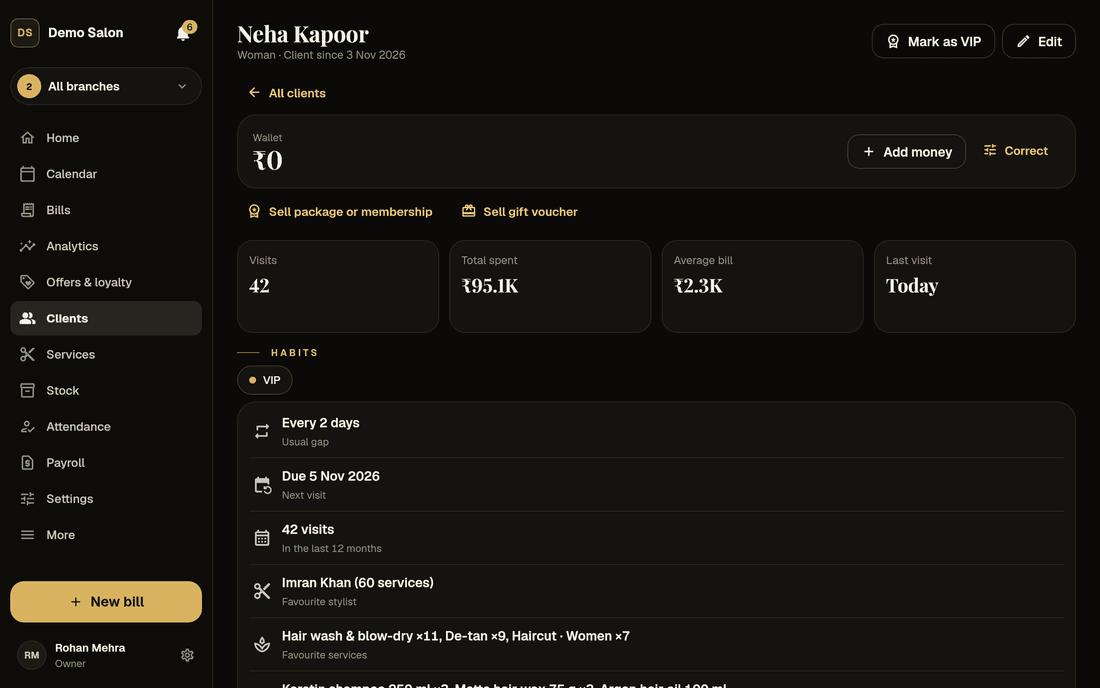
Only the mobile number and name are needed. Everything else is there when you want it, and the numbers fill in from the bills.
The basics
Mobile, name, gender, birthday (the year is optional), email, address and state, and notes of up to 2,000 characters for preferences.
Allergies and skin notes
Shown with a warning sign, in their own card, so the stylist sees them before the patch test, not after.
Colour formula
Shade, developer and time, kept for next time. No more guessing from an old photo on someone’s phone.
Tags
Up to 10 of your own labels, like “Bride 2026” or “Corporate”. Filter by them later, or send them a campaign.
Habits, worked out
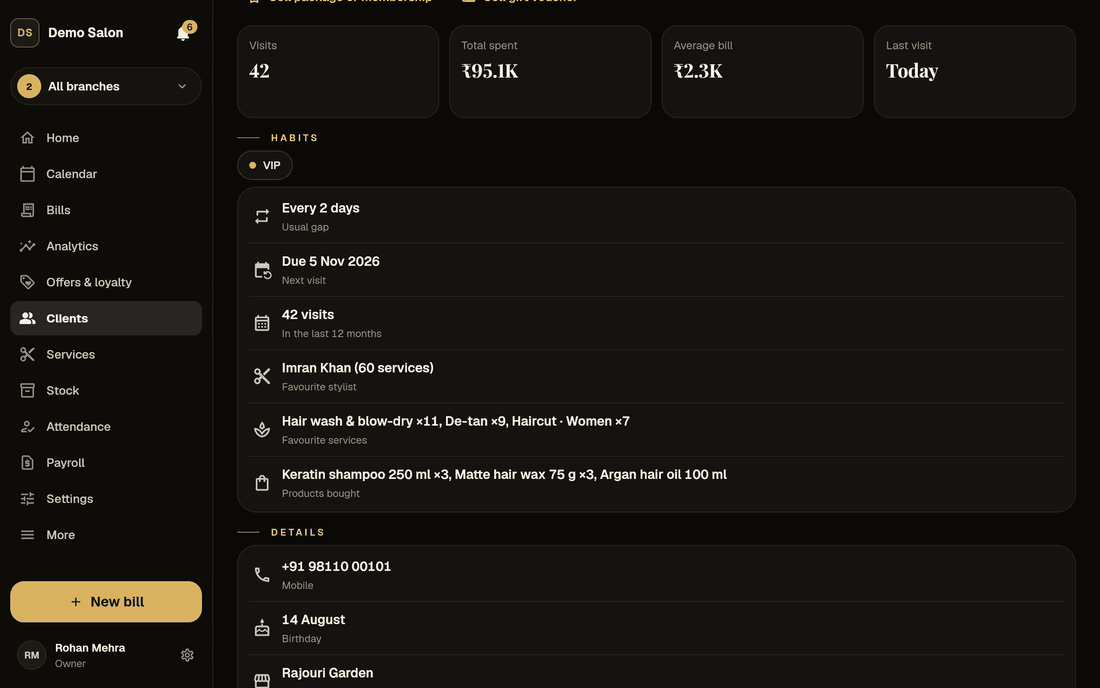
Usual gap between visits, next visit due, visits in the last 12 months, favourite stylist, top three services and products bought.
Every bill
Visits, total spent, average bill, first and last visit, and every bill listed, recounted exactly when a bill is cancelled.
Ready-made groups
Groups your salon CRM makes by itself
Gold tiles across the top of the Clients page, each with a count. A client can be in more than one: a VIP can also be at risk.
| Group | Who is in it |
|---|---|
| New | First visit in the last 30 days |
| Regular | 4 or more visits in the last 12 months |
| VIP | 20 or more visits, or the top 10% by spend, to begin with. Set your own rules (total spend, average bill, members) or mark someone VIP by hand |
| At risk | Away 1.5 times longer than their own usual gap; 60 days or more if they have visited fewer than 3 times |
| Lost | Away 3 times their usual gap, or 180 days or more |
| Win back | At risk and lost together, with the clients most worth calling first at the top |
| Also | Birthdays and anniversaries this month, members, package holders, wallet balance, owes money, no-shows |
The usual gap is never taken as less than 14 days, so a weekly blow-dry client is at risk only after 21 days away.
Win back
Know who to call first
The Win back list ranks at-risk and lost clients with a priority from 0 to 100. It weighs what they are worth (mostly their spend against your other clients, partly their visits) by how overdue they are. Someone just past their usual gap scores low; a big spender away three times her usual gap scores high. Clients away for years count a little less, because they are harder to bring back.
Each row shows their last visit, usual gap, last services, favourite stylist and spend, so the call starts with something to say. “Message this group” copies the numbers and a message to paste into WhatsApp, starting with only the clients who said yes to offers.
- Sort by “Call first”, recent visits or top spenders
- Filters and groups work together
- Automatic “We miss you” messages with Plus
Priority
Sample clients on demo data
Money and sign-ups
Udhaar, wallets and new clients, sorted
Wallet and dues, one balance
Each client has one balance with your salon, across every branch: Wallet ₹X in gold when they have money with you, or Due ₹X in red when they owe. Never both: money added pays the due first.
Add money by cash, UPI or card, collect a due with today’s bill, or let them pay part now. The Dues page lists who owes, biggest first. Only an owner can write off a due or correct a balance, with a reason.
- Top-ups aren’t sales; GST is charged when spent
- Entries are never edited or deleted
- Two tills can’t overspend one wallet
Sample dues on demo data
A tablet clients fill in themselves
Hand a tablet to a new client at the desk. They type their own name, number, birthday, anniversary and how they heard about you, and tick “Send me offers” if they want them. Their consent is recorded with the time.
The screen resets for the next person, and closing it needs an owner’s or manager’s PIN, so nobody wanders into the rest of the app. With Plus, a welcome bonus can greet them.
- Fewer typing mistakes in phone numbers
- Offers only for those who said yes
- The same number again only fills in gaps
Starting out
Moving your clients from a register to a salon CRM
Frizzi can’t import a client list from other software yet. In practice that matters less than it sounds: most of a salon’s regulars come back within a month or two, and each one is added the first time you bill them, with a number and a name. The self sign-up tablet makes the first weeks quicker, and the bills fill in visits and spend from then on.
A few habits make the records worth having:
- Always take the mobile number. It is how Frizzi finds the client at any branch, matches them in the client app, and sends reminders.
- Ask about offers, and record the answer. “OK to send offers” is off until the client says yes. Bills and booking reminders don’t need it; offers do.
- Write allergies and colour formulas the day you learn them. They are the notes stylists most wish they had.
- Use a few tags, not dozens. “Bride 2026” or “Corporate” are useful months later; fifty tags nobody remembers aren’t.
Client phone numbers stay with the front desk: stylists never see them, and only owners and managers can export the list to Excel. Owners can also download all their data at any time, on any plan. Read moving from a register to software for the full switch.
How it works
Find, filter, act
Find anyone
Part of a name or 3 digits of a number searches the whole salon, whichever branch is picked.
Filter the list
Last visit, visits, spend, services, stylist, birthday month, membership, wallet, dues, tags and more.
Do something with it
Export to Excel, copy the numbers to message, or send a campaign with Plus.
FAQ
Questions
Can I import my existing client list?
Not yet. Clients are added as they come in: at the till by number and name, at the desk, from an app booking, or on the self sign-up tablet. Your menu of services can be imported from Excel or CSV.
Do stylists see client phone numbers?
No. Stylists don’t browse the client list and never see numbers, even ones they typed. Their phone shows the price list instead of Clients.
Is a client shared across my branches?
Yes. One profile per mobile number covers all your branches, with the same history, wallet and dues everywhere. It is never shared with another salon.
How does Frizzi decide a client is at risk?
From their own habit. If a client usually comes every 30 days, they are at risk after 45 days away and lost after 90. Clients with fewer than 3 visits are at risk after 60 days, and anyone away 180 days or more is lost.
Can I export my clients to Excel?
Yes. Owners and managers can export the list on screen, with visits, spend, groups, wallet or due, birthdays and tags. Owners can also download all their data as a ZIP at any time.
Does it keep track of udhaar?
Yes. A client can pay part of a bill and leave the rest as a due. The Dues page lists who owes, biggest first, and the Dues ageing report shows how long each has been owed.
From the Frizzi guides
Guides on this
How to grow repeat clients at your salon
Grow repeat clients at your salon: rebook before they leave, remind them when they are due, win back the ones drifting away and measure who comes back.
5 min read
Running a salonMoving from a register or Excel to salon software in one afternoon
Moving from a register or Excel to salon software in an afternoon: import the menu, add staff, carry over wallet balances and dues, then a calm first week.
5 min read
Clients & loyaltyWhatsApp for salons: what to send, what not to, and what it costs
WhatsApp for salons: which messages to send, consent and quiet hours, the Business app vs the API, Meta’s per-message charges and templates that need approval.
5 min read
Run your salon on Frizzi, free for 35 days
Every feature of Pro for 35 days. No card needed. Your data stays yours, and you can export it any time.
Plans from ₹99 a branch a month, plus GST. Monthly or yearly.