
Frizzi app listing · In every plan
List your salon online where clients nearby are already looking
Every Frizzi salon gets a free listing in Frizzi, the salon listing app for clients. People within 25 km search for a haircut or a facial, see your menu with prices, your team and today’s hours, and book you or join your queue. Your listing comes with your plan, and you never pay per booking.
- Listed near clients within 25 km, branch by branch
- Your menu, prices, team, hours, offers and ratings
- Featured spots only if you want them, always marked AD
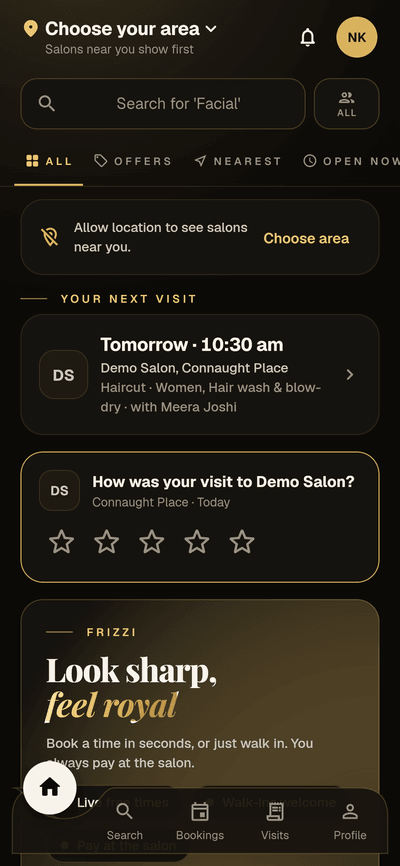
Where it stands. The Frizzi client app is built and the Android version works, but it is not on Google Play or the App Store yet: it is coming soon. The iPhone version has not run on a real iPhone yet. Everything you set up now, from your salon page to your offers, is ready for the day it opens.
Near me
Be found by clients within 25 km
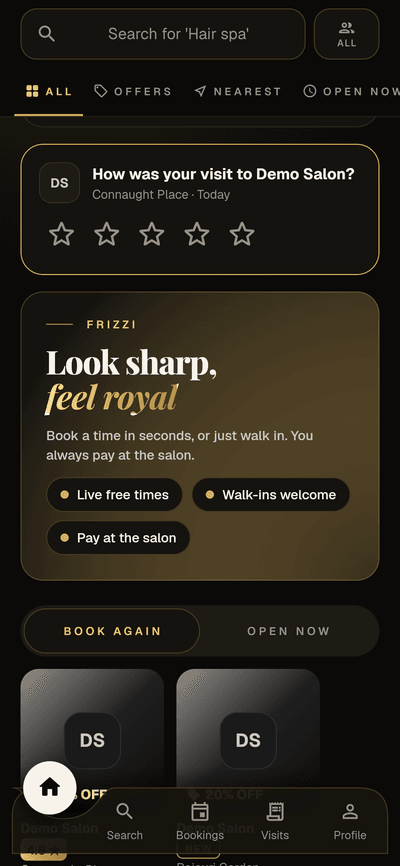
Clients open Frizzi, allow their location or pick an area, and see the salons around them, nearest first. They search for “Haircut” or “Facial”, switch between Men, Women and All, and move between the tabs Offers, Top rated, Nearest and Open now.
Round icons for haircut, colour, facial, threading, bridal and more take them straight to the salons that do it. Distance is measured from the client to each branch’s map pin, so a chain shows up branch by branch.
- Shown when the salon is active, listed and on the map
- You can turn your listing off at any time
- “Bestseller” marks each branch’s top 3 services over 90 days
Your salon page
A page for every branch that sells before they walk in
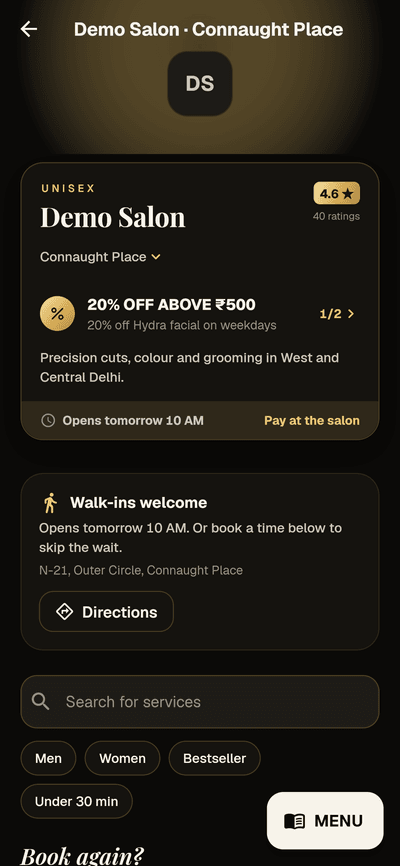
Each branch has its own page: address, today’s hours, the full menu with prices and durations, your team with their job titles, ratings, and any offers running today. A “Walk-ins welcome” card has Call and Directions buttons. Returning clients see Book again? with their last services ready to add.
It fills itself from the menu, team and hours you keep in Frizzi. Add a logo, a shop photo and a line about the salon, and say who each service is for. New salons are checked by the Frizzi team before they show, usually within a day.
How bookings work, and the rules you set for them, are on the online booking page. Ratings and your replies are on ratings and reviews.
- A branch switcher shows the client’s nearest outlet first
- Today’s app offers on the page and on your card
- Prices and menu always match your till
What your clients see
The Frizzi app for clients, screen by screen
Real screens from the client app on sample data. Tap any of them to see it larger.
After the first visit
Queue, receipts and balances in the client’s pocket
The app keeps working for you after the booking. Clients see everything they hold at your salon, so fewer calls asking “how many sessions do I have left?”.
Join the walk-in queue
Clients scan the QR sheet at your desk or tap “Join the queue” on your page. They get a token, see how many are ahead and the wait, and hear when they’re called.
Every receipt, kept
Each bill shows up as a full GST receipt, refunds included. Visits from every Frizzi salon sit in one place; each salon’s records stay separate.
Balances they can check
Wallet money or a due, packages and sessions left, membership, spend level, points and when they expire, and gift vouchers. Read only: nothing changes except at your counter.
Referral codes to share
Each client’s referral code is in the app with Copy and a WhatsApp share button.
Ratings from real visits
Only a client with a completed bill can rate it, within 30 days. Private feedback goes to you alone (Plus).
Messages that cost nothing
Reminders and updates arrive in the app’s inbox, free and unlimited. Clients choose which kinds of messages they want.
Featured placements
Show up first, and pay only for the days you’re shown
Want more people to see a new branch, or fill a slow week? Book a featured placement from Ads in the business app. Each is shared by at most 3 salons in an area, and always marked AD.
- Top of nearby salons: first in the list of salons near each client. ₹199 a day.
- Home banner: a large banner with your photo and a short headline at the top of the home screen. ₹499 a day.
Prices include GST. Pick the branch and the days, up to 90 at a time; only clients near that branch see it. When more salons want an area than there are places, they take turns at random. You pay only for days the ad was really shown, invoiced monthly and paid by UPI or bank transfer.
- Each ad shows times seen, taps, days shown and spent
- Pause, resume or stop for good at any time
- The branch must be on the map and listed first
Near Connaught Place
Prices include GST · pay only for days shown
Good to know
Getting the most from a salon listing app
Clients compare three or four salons in seconds, so the details decide who gets the booking.
Put the pin in the right place
Near-me results are measured from the map pin. Stand in the salon and use “Use this device’s location” rather than dropping a pin from memory: a pin 2 km off puts you behind the salon next door.
Give real prices and real times
Clients skip “call for price”. If a price depends on hair length, list the starting price and say so. Durations matter too: they decide which times the app offers.
Use offers for quiet hours, not every hour
An app offer can run only on some days and between set hours, such as Tuesday to Thursday, 11 am to 4 pm. That fills slow afternoons without discounting your Saturday.
Thinking about what to charge? Read our guide to pricing salon services.
How it works
Get your salon listed
Put each branch on the map
Its pin, area name and cover photo, on the Store page. Standing in the salon, one tap sets the pin.
Check your menu and team
Prices, durations, who each service is for, and which stylists take clients.
Add an offer if you like
A percent or flat offer, for some days, hours, services or branches.
Feature a branch when it suits you
Book a placement for a few days, watch how many see and tap it, and stop when you like.
FAQ
Questions
Does listing my salon in the Frizzi app cost extra?
No. Every Frizzi salon is listed as part of its plan, from Basic at ₹99 a branch a month plus GST. Featured placements are the only extra, and they are optional.
Does Frizzi take a commission on bookings from the app?
No. Clients always pay you at the salon, by cash, UPI or card. Frizzi takes no share of any bill and never holds your money.
What do featured placements cost?
“Top of nearby salons” is ₹199 a day and the home banner is ₹499 a day, GST included. Only 3 salons share each placement in an area, every ad is marked AD, and you pay only for days it was actually shown.
Can I keep my salon out of the app?
Yes. You can turn the listing off. A branch also shows only once its map pin is set. Your till, calendar and the rest of Frizzi work the same either way.
When will clients be able to download the app?
Soon. The app is built and the Android version works, but it is not on Google Play or the App Store yet, and the iPhone version is still untested on a real iPhone. Set up your page now and it is ready on day one.
What happens to my listing if my plan is unpaid?
After the grace days, a view-only salon is hidden from near-me and search, and the app takes no new bookings or queue joins for it. Clients still see the bookings they already have. Paying puts everything back at once.
From the Frizzi guides
Guides on this
How to grow repeat clients at your salon
Grow repeat clients at your salon: rebook before they leave, remind them when they are due, win back the ones drifting away and measure who comes back.
5 min read
Running a salonWalk-ins and appointments: how to run both without long waits
How to run walk-ins and appointments together: blocks, “anyone free”, processing and buffer time, a token queue, a waitlist and honest wait times for clients.
5 min read
Money & the counterPricing salon services: cost, margin and when to raise prices
Pricing salon services the right way: product cost per service, stylist time and commission, rent per chair-hour, margin and GST, with a worked colour example.
5 min read
Run your salon on Frizzi, free for 35 days
Every feature of Pro for 35 days. No card needed. Your data stays yours, and you can export it any time.
Plans from ₹99 a branch a month, plus GST. Monthly or yearly.