
Setup & your plan · In every plan
Salon software setup that has you billing in minutes
Frizzi’s salon software setup is nine short steps, and only three are needed before your first bill. Start free with 35 days of Pro, no card, and change your plan yourself whenever you like.
- About five minutes to your first bill
- 35 days of Pro free, no card
- Upgrade, move down or cancel from the app
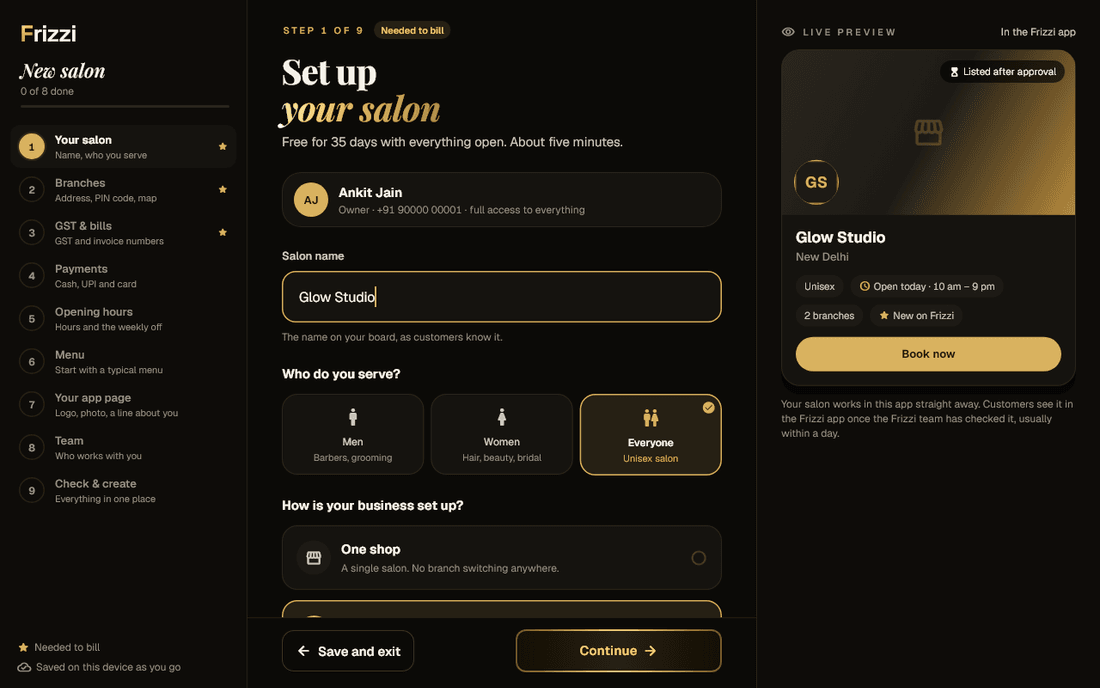
The setup wizard
Nine short steps, and only three before your first bill
Steps marked “Needed to bill” come first; the rest have Skip for now. A live preview shows your app card and receipt as you type, and answers save as you go.
Your salon
The name on your board, who you serve, and one shop or several branches.
Branches
Area, PIN code (it fills in state and city), address and map pin.
GST and bills
Your GSTIN, checked as you type, or “Not yet”. GST inside prices or on top, and your invoice prefix.
Payments
Cash, UPI and card, and your UPI ID for the till’s QR.
Opening hours
The same every day or day by day, and your weekly off.
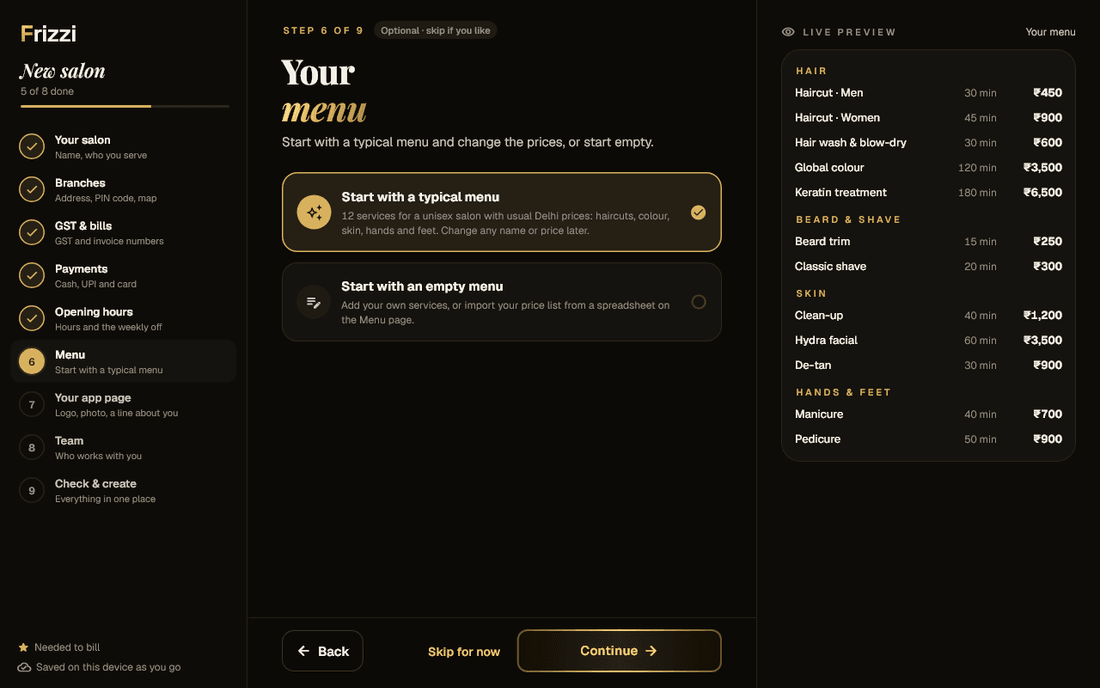
Menu
A typical menu to adjust, or an empty one.
Your app page
Logo, shop photo and a line about the salon.
Team
Name, mobile, role and first PIN for each person.
Check and create
Everything on one page, then Start billing.
Starter menus
Don’t type your menu from scratch
Choose Start with a typical menu and Frizzi fills in 12 common services in Hair, Beard and shave, Skin, and Hands and feet, each with a usual time and price. A men-only salon gets no women’s haircut and a women-only salon no beard trim. Change any name, time or price later.
Already have a price list? Choose an empty menu and use Import from a spreadsheet on the Menu page:
- Fill in the template (category, service, price, duration, who it’s for) in Excel or CSV, up to 1,000 rows.
- A preview shows what will be added, updated (“Price ₹500 → ₹600”) and skipped, and why, before anything changes. Then everything saves together, or nothing does.
The import is for services only. Products are added in the app, and clients as they come in: client lists aren’t imported.
- 12 typical services, trimmed to who you serve
- Import services from Excel or CSV with a preview
- “Export my menu” to edit and import again
After setup
Where you finish setting up, when you have a minute
The finish screen lists what’s left, such as photos, the map pin and your team, and each line takes you to the right page. Real screens on sample data.
35 days of Pro, free
Try everything for 35 days, with no card and nothing to undo
Every new salon starts with 35 days of Pro: payroll, full stock, shifts and leave, memberships and every other feature switched on. No card, nothing to cancel.
Only the owner sees “Pro trial · days left” on More. Seven days before the trial ends, your first invoice arrives: for Basic, unless you chose Plus or Pro. Choose a plan during the trial and it starts the day the trial ends.
When the trial ends your data stays as it is. Features of a bigger plan just close until you move up again. See the pricing page for what each plan has.
- Every Pro feature open from day one
- Basic after the trial, unless you choose another plan
- Clients, bills and history kept whatever you choose
Day by day
Sample timeline for a salon that hasn’t chosen a plan yet.
Your plan
Change your plan yourself, any time
Owners manage the plan from More → Your plan. Each change shows what it does and what it costs before you confirm.
| You want to | When it happens | What you pay |
|---|---|---|
| Move up (Basic → Plus, Plus → Pro) | At once | Only the difference for the days left in this period |
| Move down to a smaller plan | At your next renewal | The smaller plan from then; nothing is refunded |
| Switch monthly ↔ yearly | At your next renewal | Yearly is 10 months’ price for 12 |
| Cancel | Your salon works until the end of what you paid | Nothing more. Change your mind with Keep my plan |
| Come back after cancelling | The day you choose a plan | That plan, from that day |
After a cancelled plan ends, the salon is view-only and hidden from the Frizzi client app: you can still see and download everything. To have your data deleted, ask us. Invoices are due in 15 days and paid by UPI or bank transfer; there is no card payment or AutoPay yet. More than 15 branches? Talk to us for an agreed price.
Help where you need it
A real answer when you’re stuck
Help & support in the app
Tap New request, say what it’s about, add up to three screenshots and send. Replies come back in the app, usually within a day, next to quick answers to common questions.
WhatsApp or call
Message or call us on +91 96507 68356. Call, WhatsApp and Email buttons are also on the Help & support page in the app.
Write to hello@frizzi.app from anywhere, including before you sign up, or if you can’t open the app.
Try before you set up
Make a bill in the working demo on this site, with sample prices, before you create your salon.
Before you start
Salon software setup: what to have ready
Setup goes fastest with these to hand:
- Your GST certificate, if you’re registered: the GSTIN and the legal name exactly as printed. Not registered? Your bills are bills of supply until you add it.
- Your UPI ID, from your UPI app’s profile page.
- Your price list, on paper or in Excel.
- Your team’s mobile numbers, and a first 6-digit PIN for each.
- An invoice prefix of 2 to 4 letters or digits, such as GS, so numbers read GS/26-27/00001.
See also how a salon GST invoice should look.
How it works
From sign-up to first bill
Sign in with your number
Open business.frizzi.app, enter your mobile number and the SMS code, and choose a PIN.
Answer the three needed steps
Your salon, your branches, and GST and bills. Skip the rest for now if you’re in a hurry.
Start billing
The finish screen’s Start billing opens the till, with your menu and UPI QR ready.
Finish the list later
Photos, the map pin, your team and the printer, each one tap from the finish list.
FAQ
Questions
How long does Frizzi take to set up?
About five minutes for the three steps you need before billing: your salon, your branches, and GST and bills. The other six are optional and can be done later.
Do I need a card to start the free trial?
No. Every new salon gets 35 days of Pro with no card. Seven days before it ends you get your first invoice, for Basic unless you chose Plus or Pro, paid by UPI or bank transfer.
What happens when the 35 days end?
Your salon moves to your plan, Basic unless you chose another. Your clients, bills and history stay exactly as they are. Pro-only features close until you move up.
Can I import my services and clients from my old software?
You can import your service menu from Excel or CSV, with a preview before anything changes. Products and clients aren’t imported: products are added in the app, and clients are added as they visit.
Can I change or cancel my plan myself?
Yes, from More → Your plan. Moving up starts at once and you pay only the difference for the days left. Moving down or switching between monthly and yearly starts at your next renewal. You can cancel any time: the salon works until the end of what you paid, then becomes view-only.
Is there a setup fee?
No. There is no setup fee and no share of your bills. You pay your plan per open branch, plus 18% GST.
From the Frizzi guides
Guides on this
Moving from a register or Excel to salon software in one afternoon
Moving from a register or Excel to salon software in an afternoon: import the menu, add staff, carry over wallet balances and dues, then a calm first week.
5 min read
GST & taxSalon GST invoice format: what every bill must show
The salon GST invoice format under Rule 46: invoice number rules, GSTIN, SAC, taxable value, CGST and SGST, the ₹50,000 rule, bills of supply and credit notes.
5 min read
Money & the counterPricing salon services: cost, margin and when to raise prices
Pricing salon services the right way: product cost per service, stylist time and commission, rent per chair-hour, margin and GST, with a worked colour example.
5 min read
Run your salon on Frizzi, free for 35 days
Every feature of Pro for 35 days. No card needed. Your data stays yours, and you can export it any time.
Plans from ₹99 a branch a month, plus GST. Monthly or yearly.