
Devices & printers · In every plan
Salon software for tablet and phone that runs on what you already have
Frizzi is salon software for tablet and phone, and for the computer at your desk. It works in the browser today at business.frizzi.app, and the Android and iPhone apps are coming soon. One login, the same salon, on every screen: the till on the counter tablet, the calendar on the manager’s phone.
- Works today in the browser on any computer or tablet
- Thermal receipts on 58 mm or 80 mm paper, or A4
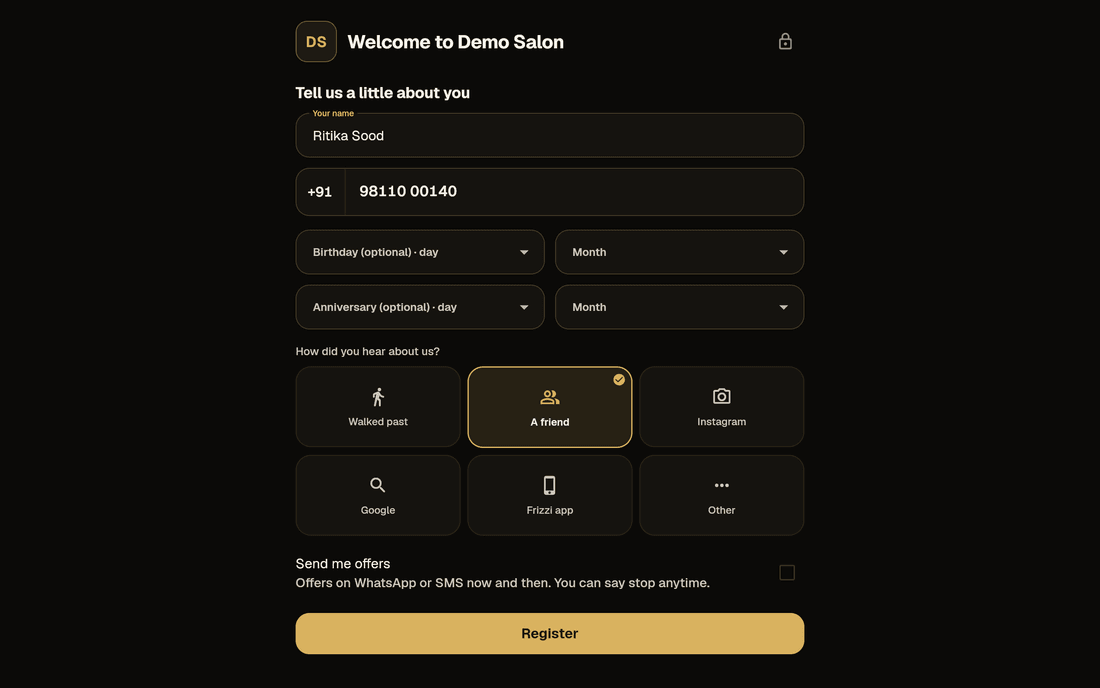
- A front-desk tablet for check-ins and client sign-up
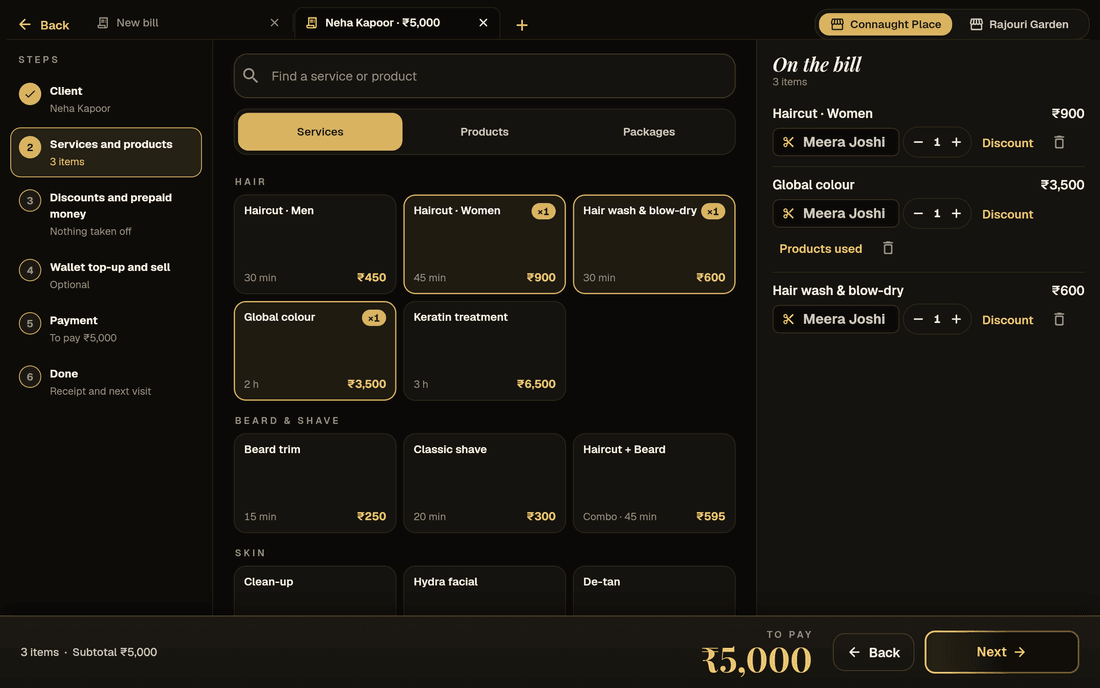
Web, Android and iPhone
Start in the browser today, add the apps when they arrive
The same account works everywhere. Bills made on the tablet show up at once on your phone and computer.
| Device | How Frizzi runs on it | Where it stands |
|---|---|---|
| Any computer (Windows or Mac) | In the browser at business.frizzi.app | Works today |
| Android tablet or phone | In the browser now; the Frizzi Business app on Google Play | App coming soon |
| iPad or iPhone | In the browser now; the Frizzi Business app on the App Store | App coming soon; not yet run on a real iPhone |
There is no separate Windows app: on a Windows PC, use the browser. The app is in English, with prices in ₹ and Indian date and number formats. Dark and light themes, or match your device.
Tablet, phone or computer
Salon software for tablet, phone or computer, laid out for each
Frizzi doesn’t shrink a computer screen onto a phone. It lays each screen out for the size you’re using.
The till
On a computer or big tablet, the menu and the bill sit side by side. On a phone, you tap services and the bill opens from the bar at the bottom.
The calendar
On a tablet or computer, a time grid with a column per stylist and drag and drop to move a visit. On a phone, a list with a stylist filter and a Move button.
Settings and Home
Settings groups sit down the left on a tablet, a page each on a phone. Each Home shows the cards for that role.
A stylist’s phone
Stylists see their day, their earnings and the menu with prices, but never client phone numbers.
Many branches
A switcher shows “All branches” or one. Managers and reception see only their own branches.
Sign in on any device
Mobile number, an SMS code, then your own 6-digit PIN. No passwords.
On a phone
Frizzi Business in your pocket
Real phone screens on sample data. Owners check the day from anywhere; stylists check in and see their own work.
Receipt printers
Print a proper receipt on the printer at your counter
Frizzi prints shop-style receipts on 58 mm (the small 2-inch roll) or 80 mm thermal paper, or on A4. Or share a PDF, or send it on WhatsApp. How the printer connects depends on the device:
- Android app: a Bluetooth printer paired in Android’s settings (the code is often 0000 or 1234), or a USB printer on an OTG cable.
- iPad and iPhone app: Bluetooth, a Wi-Fi printer on the salon’s network, or AirPrint.
- In the browser: your browser’s print window, with any printer the computer already uses.
In the apps, each bill can print by itself as soon as it’s charged, in one or two copies. Reprints say DUPLICATE.
Before you buy a printer: printing is built for standard thermal receipt printers but hasn’t yet been tried on a real one in a salon. Tell us the model and we’ll check it with you first.
- 58 mm, 80 mm, A4 or PDF
- Print automatically after each bill, 1 or 2 copies
- A test receipt to check the paper width
Demo Salon
Connaught Place, New Delhi
GSTIN 07AAAAA0000A1Z5 · Tax invoice
Bill DS/26-27/00042 · 3 Nov 2026, 6:42 pm
SAC 9997 · Computer-generated bill
Sample bill on demo data
Barcode scanners
Scan a product instead of searching for it
Barcode scanning is built and tested in the software, but not yet with every scanner gun and camera in a real salon, so try yours on the free trial.
A scanner gun at the till
A USB or Bluetooth scanner gun types the code into the till’s search box, and the product goes on the bill. In every plan.
The camera as a scanner
On a phone, tablet or computer camera: scan products in at a delivery, during a count, or to find one. Link an unknown code to a product the first time you see it.
Labels for products without one
Print your own barcode labels on A4, three across, with in-store codes that start with 2, so they never clash with a maker’s barcode.
The salon’s own device
One tablet at the front desk does three jobs
The owner marks the front-desk tablet or computer as the salon’s own device, on that device. From then on:
- Staff check in on it without their phone’s location or a selfie, even when GPS or selfie check-in is on for the branch. The owner can remove a device at any time.
- Clients sign themselves up on the self sign-up form, with their birthday and whether they want offers. Closing it needs an owner’s or manager’s PIN.
- Clients leave private feedback on the feedback tablet after their visit (Plus).
- Check-ins without GPS or selfie on the desk device
- Self sign-up with consent for offers logged
- A PIN to leave the client screens
When the signal drops
Keep billing when the internet goes, and hear what matters
Offline billing
If the internet drops, bills save on the device with a provisional receipt and send themselves when it’s back, keeping their real date and time.
The bell, everywhere
New app bookings, approvals, low stock, money alerts and the day-end summary arrive in the bell on every device, the browser included.
Push notifications
Notifications on the phone’s lock screen are built into the apps but not switched on yet. Until they are, everything comes through the bell.
How it works
Set up your counter
Open Frizzi in the browser
On the counter computer or tablet, go to business.frizzi.app and sign in with your number, the SMS code and your PIN.
Connect the printer
Choose the connection and paper width, then print a test receipt. Not sure about your printer? Ask us first.
Mark the desk device
Make the front-desk tablet the salon’s own device for check-ins and the sign-up form.
Add the phones
Staff sign in on their own phones with their own PIN and see only what their role allows.
FAQ
Questions
Do I need to buy a new tablet or computer for Frizzi?
No. Frizzi runs in the browser on the computer or tablet you already have, at business.frizzi.app. The Android and iPhone apps are coming soon.
Is there an Android or iPhone app?
Both are built and coming soon to Google Play and the App Store. The Android app works; the iPhone app hasn’t run on a real iPhone yet. Until they are out, use Frizzi in the browser on any phone or tablet.
Which receipt printers work with Frizzi?
Thermal receipt printers on 58 mm or 80 mm paper: Bluetooth or USB with the Android app; Bluetooth, Wi-Fi or AirPrint with the iPad and iPhone app; and any printer through the browser’s print window. Printing hasn’t been tried on every model yet, so tell us yours and we’ll check it with you before you buy.
Can I use a barcode scanner?
Yes. A USB or Bluetooth scanner gun adds products at the till in every plan. Camera scanning for stock, and printed barcode labels, come with Pro.
Does Frizzi work in Hindi?
The app is in English, with ₹ prices and Indian date and number formats.
From the Frizzi guides
Guides on this
Choosing a salon POS: 12 questions to ask before you pay
Choosing a salon POS in India? Ask these 12 questions about stylists, 5% GST, UPI QR, offline bills, printers, data export and the real cost per branch.
6 min read
Running a salonMoving from a register or Excel to salon software in one afternoon
Moving from a register or Excel to salon software in an afternoon: import the menu, add staff, carry over wallet balances and dues, then a calm first week.
5 min read
Run your salon on Frizzi, free for 35 days
Every feature of Pro for 35 days. No card needed. Your data stays yours, and you can export it any time.
Plans from ₹99 a branch a month, plus GST. Monthly or yearly.