
Attendance · Check-in in every plan · rules in Pro
A salon staff attendance app with GPS and a selfie
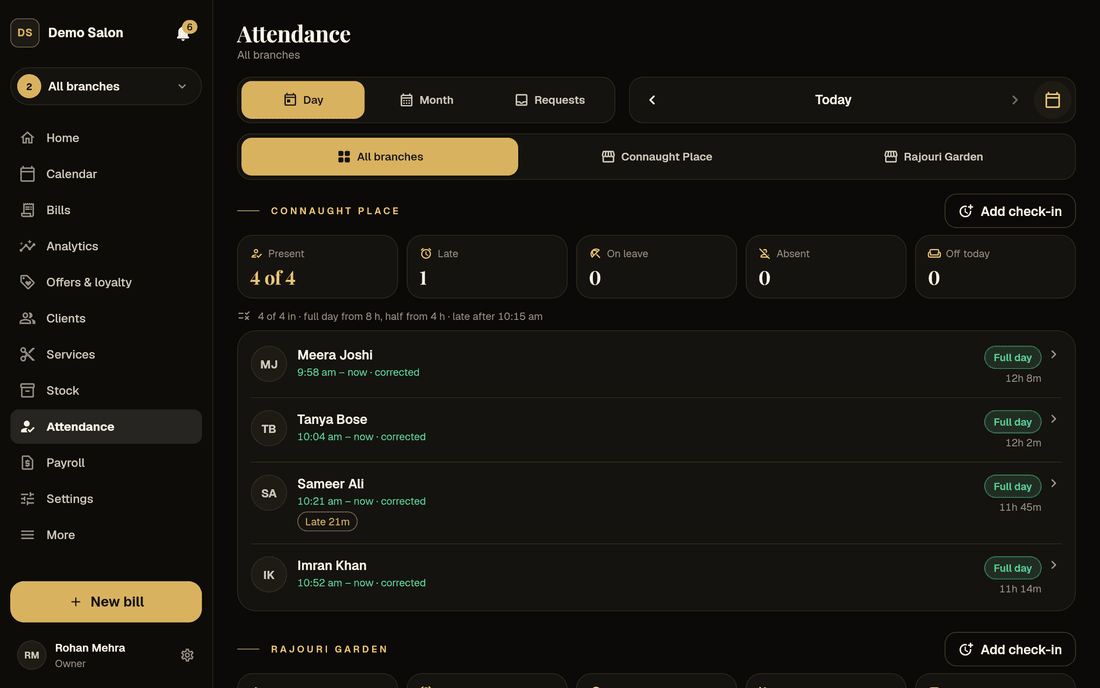
Staff check in with one tap when they arrive. As a salon staff attendance app, Frizzi can check they are really at the branch, take a selfie, mark who was late and count the month for payroll, so nobody argues over the register.
- A GPS circle of 50 to 500 m for each branch
- A front-desk tablet can check people in too
- Lates, leave and offs flow into payroll (Pro)
What you get
The salon staff attendance app in every plan, and what Pro adds
Checking in, the GPS check and the day and month views are in Basic. The rules that turn check-ins into pay come with Pro.
| Basic and Plus | Pro | |
|---|---|---|
| One-tap check-in and out, with breaks | Yes | Yes |
| GPS check at each branch | Yes | Yes |
| Check-in on the salon’s own tablet or computer | Yes | Yes |
| Day and month views, corrections by managers | Yes | Yes |
| Shifts, grace minutes, Late and Left early marks | — | Yes |
| Count the day in sessions instead of hours | — | Yes |
| Penalties for coming late | — | Yes |
| Selfie at check-in | — | Yes |
| Auto check-out at the end of the shift | — | Yes |
| “Fix my attendance” requests from staff | — | Yes |
| Leave requests and a paid-leave balance | — | Yes |
| Weekly offs, holidays and the sandwich rule | — | Yes |
| Different rules for one branch | — | Yes |
Every extra is off until you switch it on. On Basic and Plus, everyone’s shift is simply the branch’s opening hours.
Checking in
Three ways to check in, so it works at every counter
GPS: check in only at the salon
Switch on Check location at check-in for a branch and pick how close staff must be: 50, 100, 200 or 500 metres (100 to start). Stand in the salon and tap “Use this device’s location” to put the branch on the map.
Outside the circle, the check-in is refused with a clear message: “You’re 350 m from Connaught Place. Check in at the salon.” Frizzi also refuses fake-location apps and readings less sure than 100 m. The position and distance are kept with each check-in.
- Off until you switch it on, branch by branch
- Checking out is checked too
- Breaks: check out and back in
The salon’s own tablet or computer
Not everyone has a good phone, and a front-desk computer has no GPS or camera. The owner marks a tablet or computer as the salon’s own device, on that device. Staff can then check in on it without their location or a selfie.
The device keeps a secret key and the server keeps only its fingerprint, so another computer can’t pretend to be it. The owner can remove a device at any time.
- No GPS or camera needed
- Works alongside phone check-ins
- Removed in one tap
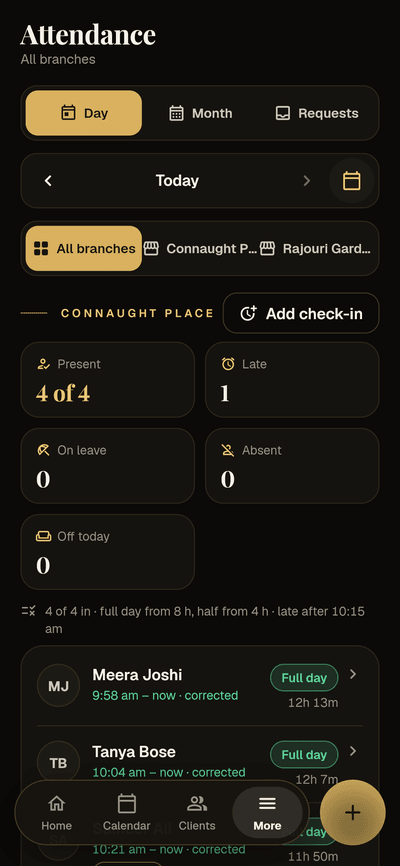
Full day from 8 h · late after 10:15 am
Sample data
A selfie at check-in (Pro)
Switch it on and checking in on a phone takes a front-camera photo first; without one, the check-in is refused. The salon’s own device is the exception.
Selfies are kept privately, never on a public link. Owners, and managers for their branches, tap See selfie, which opens through a link that lasts 5 minutes, and every view is in the audit log. Staff can’t see each other’s. Photos are deleted after 90 days; the check-in stays and says so.
- Stops a friend checking someone in
- Private, with every view logged
- Deleted automatically after 90 days
Sample data
Tried on real phones? Not yet. GPS and selfie check-in are built and pass Frizzi’s automated tests, but they haven’t been tried on real staff phones in a salon. Phone GPS indoors can be off by tens of metres, so start with the 100 m or 200 m circle, try it on your own team’s phones during the free trial, and keep the salon’s own device as a fallback. The Android and iPhone apps are coming soon; the browser version works today.
Pro · the rules
How a day counts, and what coming late costs
Shifts and grace minutes
Each person gets a shift for each weekday (the branch hours until you set one). Late means checking in after the shift start plus the grace minutes, 15 to start, and shows as “Late 20m”. Leaving before the end shows as Left early. On half-day leave, late is judged against the half they work.
Hours or sessions
By hours (the default): a full day from 8 hours, a half day from 4, breaks left out. Or in sessions, the way many salons count: an 8:30 am to 8:30 pm shift makes four sessions starting 8:30, 11:30, 2:30 and 5:30. A session counts when at least half of it was worked, and coming late loses the first one.
Penalties, each off until you want it
Pick only the ones your salon uses:
- Half a day off for every 3 lates
- A fine per late, say ₹50 after the first 2
- No penalty on a day with full hours
- Leaving early counts as late
Auto check-out and fixes
Check-ins still open at the end of the shift can close themselves, marked “Auto check-out”. Staff tap “Fix my attendance” (“I came in at 10:05”) and a manager or the owner approves it; the day then says who asked and who approved. Fixes go up to a month back.
Pro · leave and days off
Leave, weekly offs, holidays and the sandwich rule
Leave
Staff apply from My attendance: a date or a range, a full day or the first or second half, paid or unpaid, with a reason. A manager of their branch or the owner approves or turns it down. Managers and owners can also enter leave for someone, approved at once. Nobody approves their own leave except an owner. Set paid leave a year (say 12 days) and staff see how many paid days they have left; leave beyond it is unpaid unless the approver keeps it paid.
Weekly offs
Either a number of days off a month (4 to start), which you can pick on a calendar or leave unpicked, or fixed weekdays such as every Tuesday. They show as Off, never as Absent.
Holidays
Add Diwali or Holi for all branches or chosen ones. The branch counts as closed: everyone is paid for the day, and nobody can book it in the calendar, at the till or in the client app.
The sandwich rule
Off by default. If someone is absent without approved leave on the working day before and the working day after a weekly off or holiday, that day off becomes unpaid too. Absent on Saturday and Monday makes Sunday unpaid. Present or on approved leave on either side, and it stays paid. It only looks within the month.
Leave, offs and holidays also shade the stylist’s column in the appointment calendar, so nobody books a client with someone who isn’t there.
An honest register
Nothing disappears, nothing changes silently
Never deleted
A check-in is never deleted. A mistaken one is voided: it stays listed, struck out, and stops counting.
Corrections with a reason
Managers correct times, add a missed check-in or void one, always with a reason, and only for reception and stylists. A manager’s own times are the owner’s to fix.
Forgot to check out
A check-in left open overnight is marked No check-out for a manager to fix, and counts up to the end of the shift until then. Nobody can close it the next morning and count the night.
Staff at several branches
Someone who works at two branches picks the branch when they check in. With “All branches” picked, the day and month views show each branch in its own section.
Straight into payroll
In Pro, payroll reads days worked, lates, fines, leave, offs, holidays and sandwich days from attendance. Nothing is typed twice.
Attendance summary report
Each person’s whole month, counted the way payroll counts it, as Excel or PDF. One of Frizzi’s 39 reports.
How it works
Setting up attendance
Staff check in from Home
Nothing to set up: everyone gets the check-in card on Home with their own login.
Switch on GPS for a branch
Stand in the salon, set its place on the map and pick the circle. Try it on your team’s phones first.
Mark the front-desk device
On the desk tablet or computer, mark it as the salon’s own, for anyone without a phone.
Add the rules (Pro)
Shifts, weekly offs, leave allowance, holidays and any penalties. Each one only when you want it.
FAQ
Questions
Can staff check in from home with a fake location?
With GPS on, Frizzi refuses check-ins outside the branch’s circle, refuses fake-location apps, and refuses readings less sure than 100 m. This is built and tested in code but not yet on real phones, so try it with your team during the trial and add a selfie (Pro) if you need more.
What if someone doesn’t have a smartphone?
Mark the front-desk tablet or computer as the salon’s own device. Anyone can check in on it with their own login, without GPS or a selfie.
How long are selfies kept, and who can see them?
Selfies are private. Owners, and managers for their own branches, can open one through a link that lasts 5 minutes, and every view is logged. Staff can’t see each other’s. Photos are deleted automatically after 90 days; the check-in record stays.
Can I count attendance in sessions instead of hours?
Yes, in Pro. The shift is split into equal sessions, 4 a day to start. A session counts when at least half of it was worked, and the day is worth the sessions that count. You can also add rules for short days.
What is the sandwich rule?
An optional Pro rule: a weekly off or holiday becomes unpaid when the person was absent without approved leave on the working day before and the working day after it. For example, absent Saturday and Monday makes Sunday unpaid. It is off until you switch it on.
Does attendance work out salaries by itself?
In Pro, yes: payroll reads paid days, lates, fines and leave straight from attendance and works out loss of pay. On Basic and Plus, attendance is a record you can export, and you work out salary yourself.
Which plan do I need for GPS check-in?
GPS check-in, the salon’s own device and the day and month views are in every plan, from ₹99 a branch a month plus GST. Shifts, late rules, selfies, leave, weekly offs and holidays are in Pro.
From the Frizzi guides
Guides on this
Salon staff attendance: fair rules for shifts, lates, leave and offs
Salon staff attendance rules that feel fair: shifts and grace minutes, late marks, half days, leave, weekly offs, the sandwich rule, GPS and selfie check-in.
5 min read
Staff & paySalon payroll in India: salary, commission, loss of pay and payslips
Salon payroll in India made clear: salary plus commission, loss of pay by day, advances, tips and payslips, with a worked example and where PF, ESI and TDS fit.
5 min read
Run your salon on Frizzi, free for 35 days
Every feature of Pro for 35 days. No card needed. Your data stays yours, and you can export it any time.
Plans from ₹99 a branch a month, plus GST. Monthly or yearly.