
Till (POS) · In every plan
A salon POS that bills in a few taps
Tap the services, pick who did them, choose how the client pays. Frizzi works out the discounts, GST and change, prints or sends the receipt, and keeps the drawer honest.
- UPI QR with the amount filled in, cash, card or split
- Bills while the internet is down, numbered when it’s back
- Every bill kept: cancel and refund only with a reason
Try it here
Make a bill right now
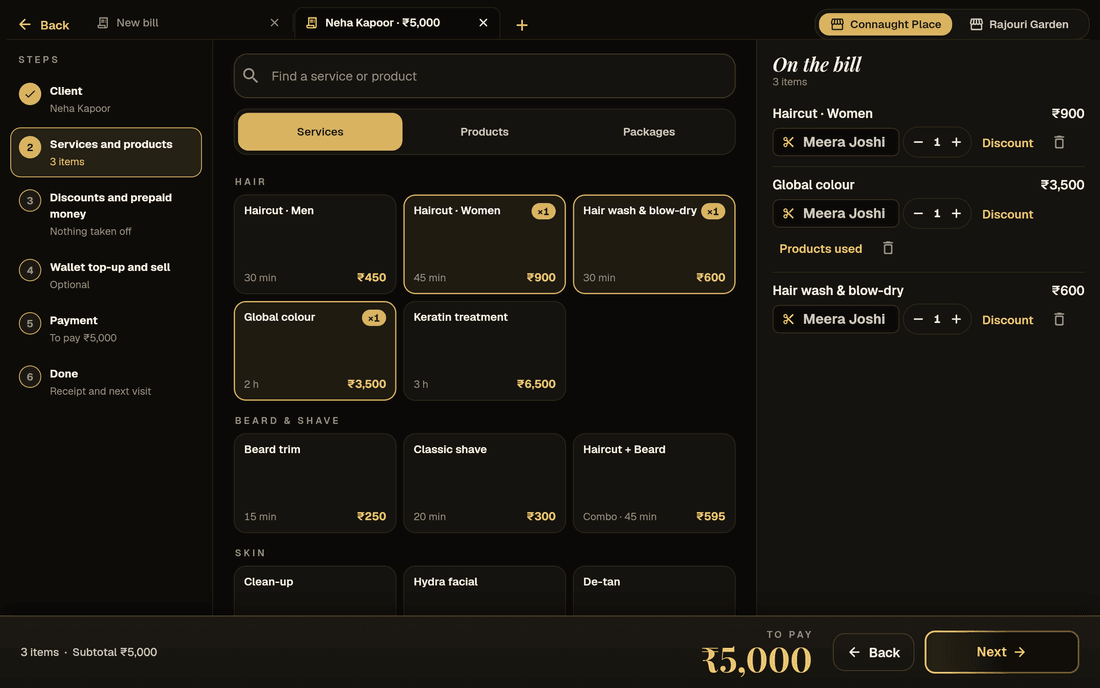
A working copy of the till with sample data: pick the client, tap services, see the member discount come off by itself, pick how the client pays and slide to complete.
The till demo needs JavaScript. The screenshots on this page show the same till.
Demo with sample data. Nothing is saved or sent.The Frizzi Business till with sample data: bills in tabs along the top, the six steps down the side (a strip on phones), the bill bar along the bottom. Prices include GST, as the app does by default. Rajouri Garden makes bills of supply; switch to Connaught Place for a tax invoice with 5% GST as CGST 2.5% + SGST 2.5%.
At the counter
Everything a salon bill needs, nothing it doesn’t
Services with their stylist
Each service on the bill carries the person who did it, so commission is right without anyone writing it down. Combos like “Haircut + Beard” are one line at one price.
UPI, cash, card or split
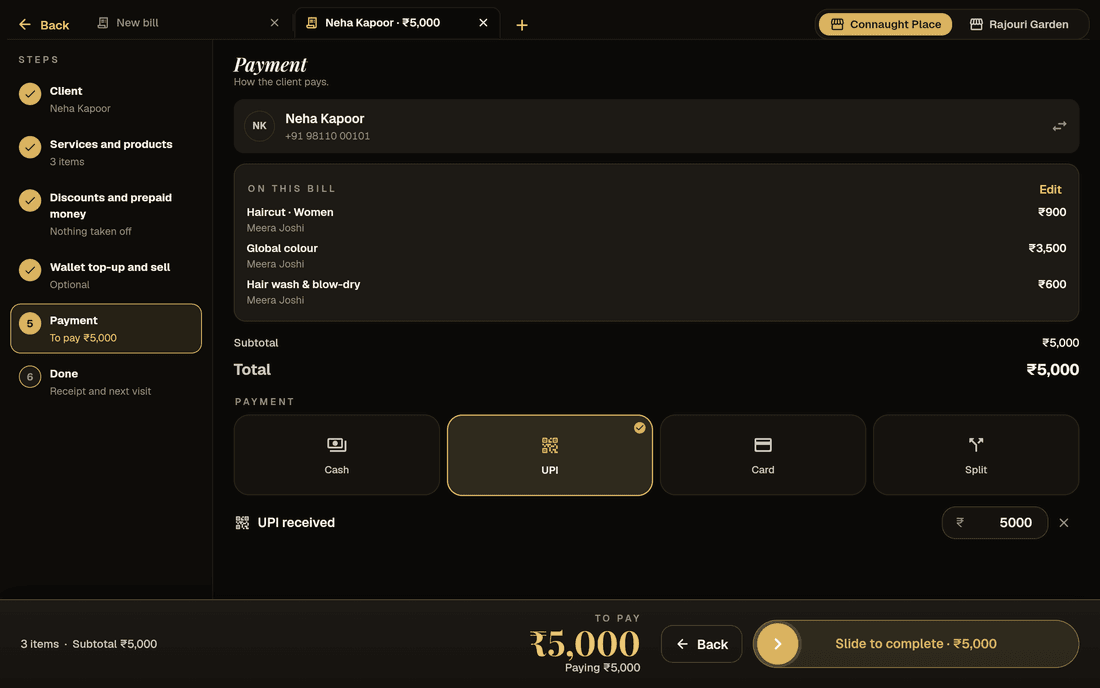
Show a UPI QR with the amount already in it; the money goes straight to your bank. Cash shows the change to give back. Split a bill across methods.
Wallet, dues and pay later
Pay from the client’s wallet, take part now and leave a due, or collect an old due with today’s bill. One balance per client across all your branches.
Tabs and held bills
Open a new bill with “+” while another is still going, like tabs in a browser. Hold up to 10 bills and come back to them.
Hints that sell for you
The till notices when a combo is cheaper, a package session can be used, or a membership would pay off today, and says so. Only for features you use.
Tips, to the right person
Add a tip and say who it’s for. Tips go on the payslip, or are handed out daily through the cash tally. They are kept out of GST.
Payments and receipts
From “to pay” to “next bill” in one screen
Take the money the way your clients pay
Cash, UPI and card are on from day one. Each branch can have its own UPI ID. Paid more than the bill? Give the rest back in cash, add it to the client’s wallet, or put it towards a due.
Card payments are recorded with one tap. Frizzi doesn’t connect to card machines and never holds your money.
- “Show UPI QR” with the amount filled in
- “Give back ₹550” worked out for cash
- Over-payment to wallet or due
A proper receipt, printed or on WhatsApp
The receipt opens the moment you charge: print it on a 58 mm or 80 mm thermal printer or A4, share a PDF, or send it on WhatsApp. Clients with the Frizzi app also see the full bill there.
Reprints say DUPLICATE. Bills with a GSTIN are tax invoices with CGST and SGST shown; without one, a bill of supply.
- Thermal 58 / 80 mm, A4 or PDF
- Amount in words, “Billed by”
- GST summary by rate
Demo Salon
Connaught Place, New Delhi
GSTIN 07AAAAA0000A1Z5 · Tax invoice
Bill DS/26-27/00042 · 3 Nov 2026, 6:42 pm
SAC 9997 · Computer-generated bill
Sample bill on demo data
When the internet drops
The till keeps working offline
If the connection goes, bills are saved on the device with a provisional receipt. When it comes back they send themselves, get their invoice number and keep their real date and time.
What works offline
Service, combo and product bills paid by cash, UPI or card, with a tip and a client.
What waits for the internet
Wallet, vouchers, points, packages, pay later, dues and member discounts need the server, so they hide until you’re back online.
Good to know
The till must have opened once while online that day. A device that is lost or wiped before it reconnects loses its unsent bills.
Controls
An honest counter, without watching it all day
Bills are never deleted
Managers can cancel today’s bills and owners any bill, always with a reason. Refunds make a GST credit note. Only owners can edit a bill, and other owners are told.
Discount limits and approval
Reception can give up to 10% by default; more needs an owner’s or manager’s PIN on that bill. Switch on bill approval and stylists can start a bill that the desk finishes.
Money alerts to owners
Owners hear when a bill is cancelled, refunded or changed by someone else, when a big discount is approved, and when a client was marked “here” but never billed.
Cash tally at closing
Count the drawer note by note. Frizzi shows what should be there and says Matches, Short or Over, with the bank deposits and payouts in between.
Devices
Runs on what you already have
| Device | How it runs | Printing |
|---|---|---|
| Any computer | In the browser at business.frizzi.app | Your browser’s print window, A4 or thermal |
| Android tablet or phone | The Frizzi Business app (coming soon on Google Play) | Bluetooth or USB thermal printers |
| iPad or iPhone | The Frizzi Business app (coming soon on the App Store) | Bluetooth, network or AirPrint |
The Android and iPhone apps are ready but not in the stores yet; the browser version works today. The app is in English.
How it works
A bill, step by step
Tap the services
Search or tap from your menu. Each service asks who did it; products come off stock by themselves.
Pick the client
Search by name or number, type a new number, or bill a walk-in. Member prices and wallet balance show up at once.
Choose how they pay
UPI QR, cash, card, wallet, a voucher, or a mix. Add a tip and say who it’s for.
Charge and send
The receipt opens with Print, PDF and WhatsApp. Book the next visit, then “Next bill”.
FAQ
Questions
Does the Frizzi POS work without the internet?
Yes, for normal bills. Service, combo and product bills paid by cash, UPI or card are saved on the device and sent when the connection is back, with their real date. Wallet, vouchers, points, packages and dues need the internet, so they hide while you are offline.
Can I take UPI payments on the till?
Yes. “Show UPI QR” puts a QR code on screen with the amount filled in. The money goes straight from the client to your own bank account; Frizzi never holds it. Each branch can have its own UPI ID.
Does it connect to my card machine?
Not yet. Card payments are recorded with one tap, and the card machine works on its own as it does today.
Which printers work?
Thermal receipt printers (58 mm or 80 mm) over Bluetooth or USB with the Android app, and any printer through the browser’s print window on a computer. You can also print on A4 or share a PDF. Tell us your printer model and we’ll check it with you before you buy anything.
Can a bill be deleted?
No. Bills are never deleted. A bill can be cancelled or refunded with a reason, which makes a GST credit note when needed, so your invoice numbers never have gaps and your books always add up.
Is the POS in every plan?
Yes. The till, GST bills, receipts, offline billing, UPI, wallet and dues are in Basic (₹99 a branch a month plus GST). Discount limits and bill approval come with Plus.
From the Frizzi guides
Guides on this
Choosing a salon POS: 12 questions to ask before you pay
Choosing a salon POS in India? Ask these 12 questions about stylists, 5% GST, UPI QR, offline bills, printers, data export and the real cost per branch.
6 min read
Money & the counterClosing the day: a salon cash tally routine that works
Closing the day at a salon: work out expected cash, count note by note, record short or over, log payouts and bank deposits, and act on repeat shortages.
5 min read
GST & taxSalon GST invoice format: what every bill must show
The salon GST invoice format under Rule 46: invoice number rules, GSTIN, SAC, taxable value, CGST and SGST, the ₹50,000 rule, bills of supply and credit notes.
5 min read
Run your salon on Frizzi, free for 35 days
Every feature of Pro for 35 days. No card needed. Your data stays yours, and you can export it any time.
Plans from ₹99 a branch a month, plus GST. Monthly or yearly.