
Online booking · In every plan
A salon online booking app that’s free for your clients
Frizzi’s salon online booking app is one free customer app, called Frizzi, where clients find your salon, see your menu, prices and team, and book a stylist and time that is really free. They pay at the salon, and Frizzi takes no share of the bill. The app is coming soon to Google Play and the App Store.
- Clients always pay at the salon: no commission
- Your rules: notice, days ahead, accept first
- App bookings land in your calendar marked App
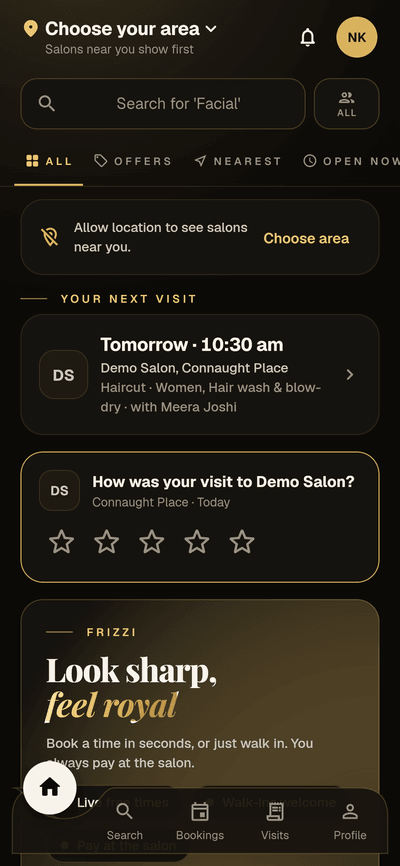
Where it stands today. The Frizzi client app is built and the Android version works, but it isn’t on Google Play or the App Store yet, and the iPhone version hasn’t run on a real iPhone. Until it is out, clients book by phone or walk in, and you book them in the calendar. Your booking rules, menu and listing can be set up in the business app now, so you are ready on day one.
What your client sees
The salon online booking app, screen by screen
Your salon page
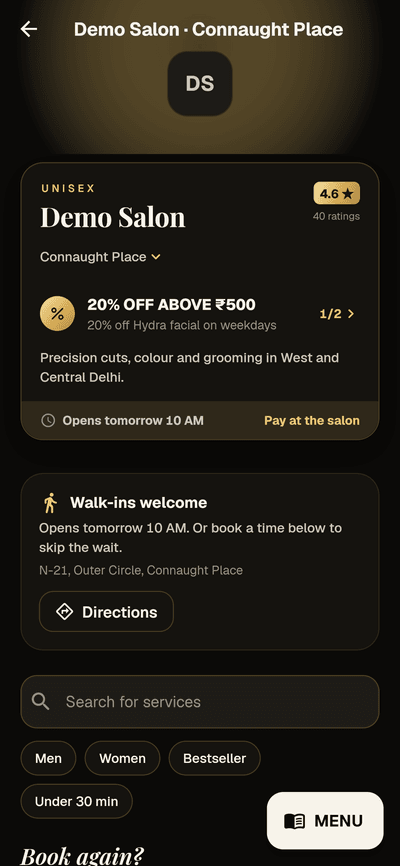
Each branch has its own page: the address, today’s hours, your menu with prices and durations, your team, ratings and any offers. Clients filter by Men, Women, Bestseller or Under 30 min, and returning clients see “Book again?” with last visit’s services.
A “Walk-ins welcome” card with Directions sits above the menu, because booking is never required. Every booking says “Pay at the salon”.
- Bestsellers: a branch’s top 3 services over 90 days
- Several branches? A switcher shows the nearest
- Who you serve: unisex, men or women
Booking a time
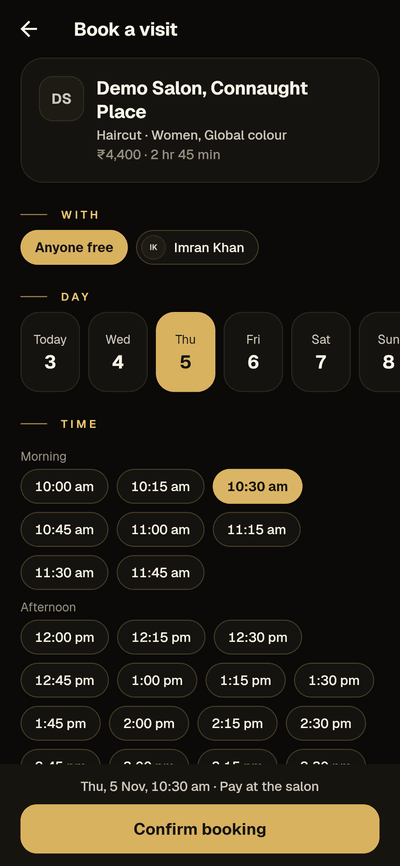
The client picks anyone free or a named stylist, a day (as far ahead as you allow, two weeks to begin with) and a time in the morning, afternoon or evening. Only stylists who do every service chosen are listed, and only times that fit the whole visit are offered.
They can add a note and a coupon or referral code. If the day is full, they can join the waitlist (Plus) instead.
- Never days off, leave, holidays or blocked time
- Someone took the time first? Fresh times are offered
- Late-cancel rules shown before they book
After booking
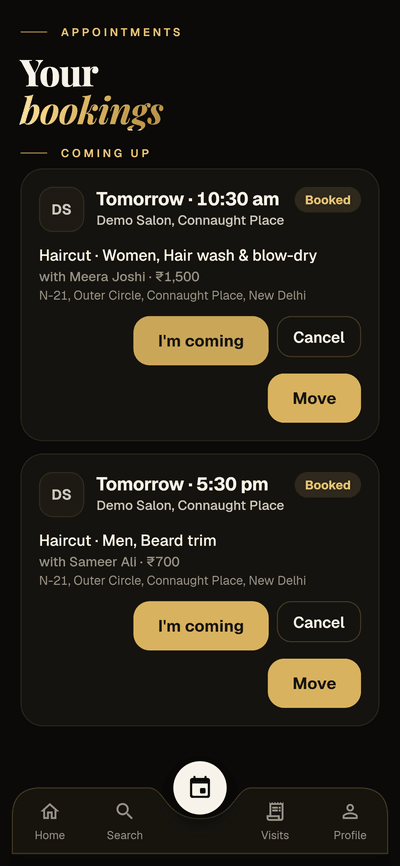
Bookings shows what’s coming up, with I’m coming, Move and Cancel. Reminders arrive in the app the day before and a few hours before. After the visit, Visits keeps every bill from every Frizzi salon as a full receipt, refunds included.
Clients also see what they hold with you, read only: wallet or due, packages, membership and level, points and gift vouchers.
- Only bookings that haven’t started can be moved
- Cancellations are recorded as made in the app
- Your own notes on a booking stay private
Your rules
Booking rules you control
Owners set these in Settings → Bookings. The server enforces them, so the app can’t book around them.
| Rule | Choices | To begin with |
|---|---|---|
| Book at least | Any time, 30 min, 1, 2 or 4 hours, or 1 day ahead | Any time |
| Book up to | 7, 14, 30, 60 or 90 days ahead | 14 days |
| Accept each app booking first | On: the time is held until you tap Accept or Decline | Off: confirmed at once |
| Services clients can book | Per service; the rest show “Call to book” | All services |
| Stylists clients can book | Per stylist, and which services each one does | All stylists, all services |
New app bookings ping the desk and managers of that branch. A declined booking tells the client why.
Why it costs you nothing per booking
Clients come through the app, and stay yours
No commission, ever
Clients pay you at the salon, by cash, UPI or card, as they do now. Frizzi takes no share of any bill and holds no money. You pay only your plan, per branch.
Your client record stays yours
Clients are matched to your records by mobile number. Their first booking adds them as your client. Each salon’s record is separate and never shared with another.
Reviews only from real visits
Only a client with a completed bill can rate it, within 30 days. Others see “Neha K.”. You can reply, or report a review for the Frizzi team to check.
App offers
Percent or flat off, with rules: minimum bill, first visit only, some services, branches, weekdays and hours. Applied at the till when the app booking is billed.
Queue by QR code
Print a QR sheet for the desk. Walk-ins scan it, get a token, see how many are ahead and hear when it’s their turn.
Ads, only if you want them
“Top of nearby salons” at ₹199 a day or a home banner at ₹499 a day, GST included, always marked AD. Pay only for days shown. Entirely optional.
Good to know
Should your salon take online bookings?
Online booking helps most where the phone rings at the wrong moment: a busy Saturday, a stylist with colour on her gloves, a client who decides at 11 pm. It helps least for long, high-value services, where the client needs a word with you first. So you don’t have to open everything at once.
- Start with your simple, popular services. Haircuts, beard trims, clean-ups and blow-dries are easy to book online. Keep bridal, keratin and colour corrections on “Call to book” until you’re comfortable.
- Set a sensible notice period. If a chair can’t be filled in 30 minutes, ask for 1 or 2 hours’ notice, so a booking never surprises the desk.
- Accept first, if your days are unpredictable. “Accept each app booking first” holds the time until someone at the desk taps Accept. Turn it off once you trust your calendar.
- Keep the calendar honest. The app only offers times your calendar shows as free. Blocks for lunch and training, and the services each stylist does, matter more once clients can book themselves.
- Tell clients where to find you. When the app is out, a counter card or a WhatsApp message with your salon’s page is the simplest start.
Your salon shows in the app only if it is active, listed, and has its map position set; you can turn the listing off at any time. “Near me” covers salons within 25 km. For more on mixing walk-ins with bookings, read walk-ins and appointments.
How it works
Ready for online bookings in an afternoon
Put each branch on the map
Its map position, area name and cover photo, and whether you serve men, women or both.
Choose what can be booked
Which services and stylists, and which services each stylist does.
Set your rules
Notice, how far ahead, and whether you accept each booking first.
Tell your clients
When the app is in the stores, share your salon’s page. Bookings arrive marked App.
FAQ
Questions
Is the Frizzi app free for clients?
Yes. Frizzi is one free app for every salon on Frizzi. Clients sign in with their mobile number and a code, and see their visits at every Frizzi salon they go to.
When will the client app be on Google Play and the App Store?
It is coming soon. The app is built and the Android version works, but it isn’t in the stores yet, and the iPhone version is still untested on a real iPhone. You can set up your booking rules and listing now.
Do clients pay online when they book?
No. Every booking says “Pay at the salon”, and clients pay you directly by cash, UPI or card. If you ask for a deposit, they pay it at the desk or by UPI to you.
Does Frizzi take a commission on app bookings?
No. Frizzi never takes a share of a bill. You pay your plan per branch, and optional ads if you choose to buy them.
Can I stop clients booking some services or stylists online?
Yes. Choose which services and which stylists can be booked in the app. Services you leave out show “Call to book”.
What if a client books a time someone else just took?
They can’t. Two people can never take the same stylist at the same time. If someone else takes it first, the app says so and offers fresh times.
Can I keep my salon out of the app?
Yes. A salon can turn its listing off. It also appears only once a branch has its map position set.
From the Frizzi guides
Guides on this
Walk-ins and appointments: how to run both without long waits
How to run walk-ins and appointments together: blocks, “anyone free”, processing and buffer time, a token queue, a waitlist and honest wait times for clients.
5 min read
Clients & loyaltyHow to reduce no-shows at your salon
Reduce no-shows at your salon with reminders the day before and hours before, deposits for big bookings, a clear policy, a waitlist and kindness to regulars.
5 min read
Clients & loyaltyHow to grow repeat clients at your salon
Grow repeat clients at your salon: rebook before they leave, remind them when they are due, win back the ones drifting away and measure who comes back.
5 min read
Run your salon on Frizzi, free for 35 days
Every feature of Pro for 35 days. No card needed. Your data stays yours, and you can export it any time.
Plans from ₹99 a branch a month, plus GST. Monthly or yearly.