
Tally export · In every plan · owners only
Tally export for salons: your month, ready for the accountant
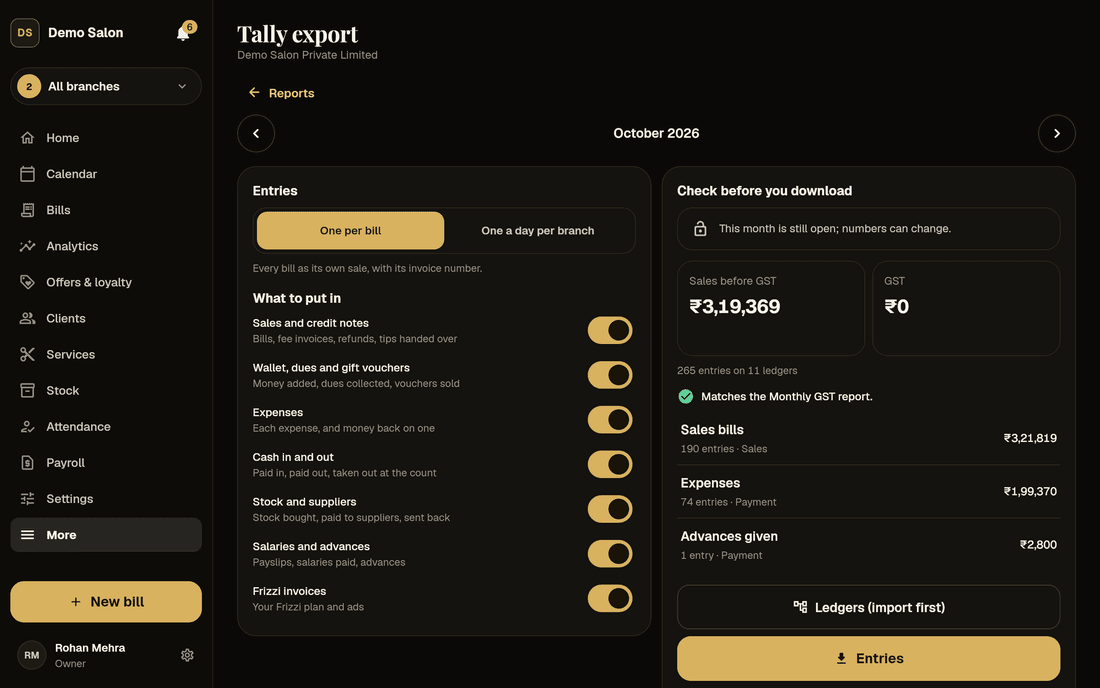
Your accountant shouldn’t have to type in a month of salon bills. Frizzi’s Tally export for salons makes two files for TallyPrime, the ledgers and then the entries, for one whole month, checked against your GST report before you download them.
- Sales, wallet, expenses, stock and salaries in one file
- “Matches the GST report” before you download
- Safe to import the same month again
Read this first. The Tally export hasn’t been imported into a real TallyPrime yet. The files follow Tally’s own help pages and pass Frizzi’s automated tests, but some XML details are not confirmed. Do your first month with your accountant, on a copy of the company in TallyPrime, before you rely on it. The steps are further down this page.
Two files
Salon software with Tally integration, done as two files
Ledgers comes first: about 30 ledgers, each in Tally’s own groups, such as Sales Accounts, Duties & Taxes, Cash-in-Hand, Bank Accounts, Current Liabilities and Sundry Debtors. Your accountant imports it as Masters.
Entries comes second, imported as Transactions: every bill, refund, wallet top-up, expense, supplier payment and payslip of the month. Choose one entry per bill, each with its invoice number, or one a day per branch, which adds up that branch’s bills for the day.
In TallyPrime: Alt+O Import, then Masters with the ledgers file, then Transactions with the entries file. Both files save like any report, to Downloads, or to Files on an iPhone or iPad.
- One company, one whole month at a time
- The same month as your Monthly GST report
- Keep the same entry choice every month
Default names: rename any of them
What goes in
Every salon money event, as a Tally voucher
Worked out from the app’s own records, not guessed. Every entry balances, debits equal to credits.
| In Frizzi | Tally voucher | In short |
|---|---|---|
| A bill | Sales | Numbered with the invoice number. How it was paid against each sales ledger by rate, CGST, SGST, round off and the tip |
| A refund, or a bill of an earlier month cancelled | Credit Note | With the credit note number and the original invoice |
| A bill cancelled in its own month | Sales, cancelled | The number kept, no amounts |
| Wallet money added, a due collected | Receipt | Into Customer Wallet or out of Customer Dues |
| A gift voucher sold | Receipt | Into Gift Vouchers Sold. Not a sale: GST is on the bill it pays |
| An expense | Payment | From cash, UPI, card or bank to the expense head |
| Cash taken to the bank at the count | Contra | Cash to Bank Account |
| Stock bought, paid to a supplier, sent back | Purchase, Payment, Debit Note | Against each supplier’s own ledger |
| A payslip (Pro) | Journal | Dated the month’s last day: salary, commission, incentives and tips, less advances and fines |
| A salary paid, an advance given | Payment | From cash, UPI or bank |
| A due written off | Journal | To Bad Debts Written Off |
Discounts and points are already off the taxable value, as on the invoice. Package sessions used are ₹0, because the package was a sale when it was sold.
Fits your accountant’s Tally
Your ledger names, your level of detail
Rename every ledger
Make each name match your accountant’s Tally. Two can share a name, for example UPI and card both going to “HDFC Bank”. With more than one company, each can have its own names.
The check before you download
How many entries of each kind and their money, and the file’s sales and GST next to the Monthly GST report: “Matches the GST report”, or the difference. It warns when the month isn’t closed yet.
Import again without doubles
Every entry carries a fixed ID, so exporting a month again gives the same IDs. In TallyPrime, set “Overwrite voucher when a voucher with same GUID exists” to Yes.
Pick what to put in
Seven switches, all on to start:
- Sales and credit notes
- Wallet, dues and gift vouchers
- Expenses
- Cash in and out
- Stock and suppliers
- Salaries and advances
- Frizzi invoices
Owners only
Off until you switch it on in Settings → Tally export. Only owners see it, the same people who see the Monthly GST report.
In Plus and Pro
The Tally export comes with Plus, from ₹799 a branch a month plus GST (salons that joined before 3 November 2026 keep it on any plan). Payslip entries need payroll, which is in Pro.
Left out
What the Tally export leaves out, and why
- B2B bills with a client’s GSTIN. Frizzi’s bills are all B2C and keep no client GSTIN.
- IGST. Salon bills in Frizzi charge only CGST and SGST.
- Stock items. The export is accounts only. Transfers, counts and write-offs move no money, so they aren’t in it.
- Input GST on purchases. Stock goes in at its cost including GST. If your CA says some GST on stock bought to resell can be claimed, the accountant splits it out in Tally.
- Expired wallet money and gift vouchers. The app records no money event when paid money expires.
Several companies share one client wallet, because a wallet works at every branch. If you ever have two companies, money added at one and spent at the other is for the accountant to settle between them.
Your first month
A safe first month with your accountant
Do this once, on a copy of your company in TallyPrime, not on the real books:
- Import the ledgers file as Masters. Check the groups and the GST details on the sales and output tax ledgers.
- Set “Overwrite voucher when a voucher with same GUID exists” to Yes, import the entries file as Transactions, and read the import report for anything created, altered or refused.
- Open a sale, a credit note, a cancelled bill, a wallet top-up and, if you use payroll, a payslip entry, and check them on screen. Make sure the Sales voucher type takes Frizzi’s invoice numbers.
- Compare Tally’s GSTR-1 and GSTR-3B for the month with Frizzi’s Monthly GST report.
- Import the same file again. Nothing should be added twice.
- If your accountant prefers day totals, try “One a day per branch” on another copy.
If anything needs changing, tell us what Tally said. When the month is right, close it in Frizzi so its numbers never change again. More on Tally for salons.
How it works
Your month into TallyPrime
Switch it on
Settings → Tally export, once. Rename any ledgers to match your accountant’s Tally.
Pick the month
One whole month, and one entry per bill or one a day per branch.
Check and download
See “Matches the GST report”, then save Ledgers first and Entries second.
Import in TallyPrime
Alt+O Import: Masters with the ledgers file, then Transactions with the entries file.
FAQ
Questions
Does Frizzi sync live with Tally?
No. It makes two XML files for one month, which you or your accountant import into TallyPrime. Nothing connects to Tally directly, so your books only change when you import.
Has it been tested in TallyPrime?
Not in a real TallyPrime yet. The files follow Tally’s own help pages on XML import and pass Frizzi’s automated tests, but some details are not confirmed. That is why the first month should be imported with your accountant on a copy of the company.
Will the Tally figures match my GST report?
They should, and the export checks it before you download: the sales and GST in the file are compared with the Monthly GST report for the same company and month, row by row, and the page says “Matches the GST report” or shows the difference.
What if I export the same month twice?
Every entry has a fixed ID made from Frizzi’s own record, so a second export carries the same IDs. With “Overwrite voucher when a voucher with same GUID exists” set to Yes in TallyPrime, importing again updates the entries instead of adding them twice.
Can I use my accountant’s ledger names?
Yes. Every ledger the export uses has a default name that you can rename for the whole salon, or per company if you have more than one.
Does the export include stock items?
No. It is accounts only: purchases, supplier payments and returns go in as money, but stock quantities, transfers and counts don’t.
Who can use the Tally export?
Owners, on Plus and Pro. It stays hidden until an owner switches it on in Settings, and managers never see it.
From the Frizzi guides
Guides on this
Tally for salons: what your accountant needs each month
Tally for salons: the monthly pack your accountant needs (sales by GST rate, credit notes, cash, bank, expenses, salaries, advances), ledgers and importing.
4 min read
GST & taxSalon GST invoice format: what every bill must show
The salon GST invoice format under Rule 46: invoice number rules, GSTIN, SAC, taxable value, CGST and SGST, the ₹50,000 rule, bills of supply and credit notes.
5 min read
Money & the counterClosing the day: a salon cash tally routine that works
Closing the day at a salon: work out expected cash, count note by note, record short or over, log payouts and bank deposits, and act on repeat shortages.
5 min read
Run your salon on Frizzi, free for 35 days
Every feature of Pro for 35 days. No card needed. Your data stays yours, and you can export it any time.
Plans from ₹99 a branch a month, plus GST. Monthly or yearly.