
Appointments · In every plan
Salon appointment booking software that never double-books
Fill every chair without ever giving one stylist two clients at once. Frizzi is salon appointment booking software built around your stylists: one column each, a 15-minute grid that always fits the whole visit, and a database that refuses two clients for one stylist at the same moment. Walk-ins, blocks, service timing and reminders are in every plan.
- A column per stylist; drag to move, with Undo
- Processing time frees the stylist for the next client
- “Bill now” fills the till from the booking

Calendar by stylist
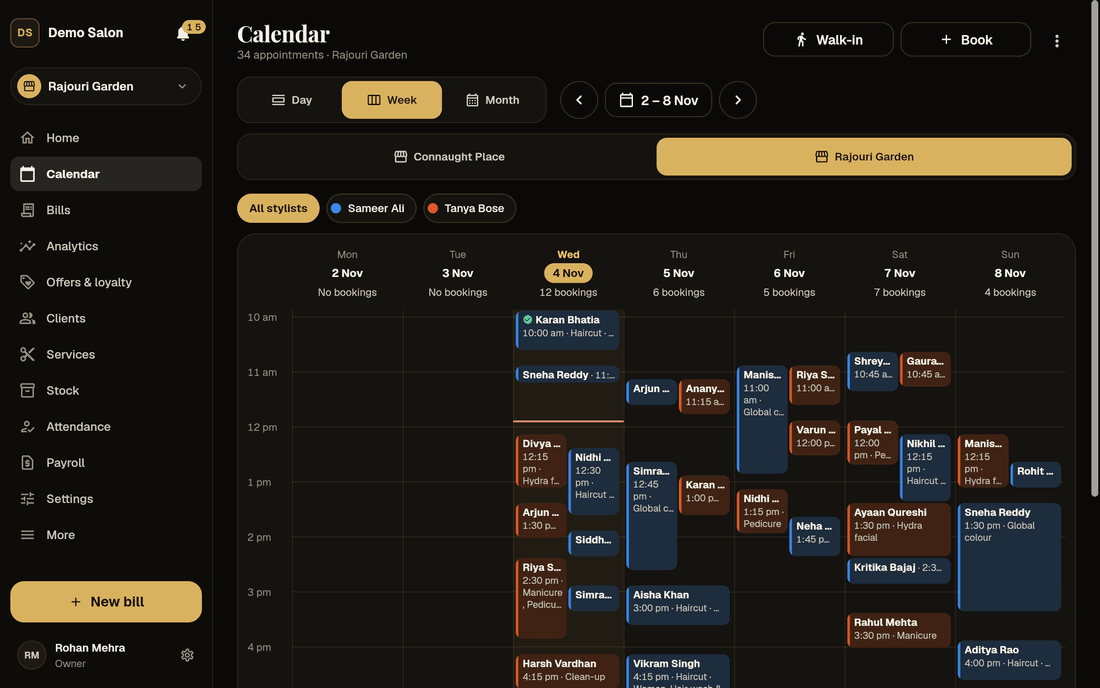
The whole day at a glance, one column per stylist
On a tablet or computer the day is a time grid with a column for each stylist and a red line for “now”. Switch to the week or the month to see what is coming. On a phone, the day is a list with a stylist filter and a Move button.
Drag a booking to another time or stylist; the same checks run as for a new booking, and “Moved to 11:30 with Sana” comes with Undo. Colours tell the story of the day: booked, here now, billed, cancelled or no-show, and app bookings waiting for you to accept.
When the client is ready, Bill now opens the till with the client, services and stylist filled in. After billing, Book next visit offers a time around when they usually come back.
- Day, week and month
- Drag to move, with Undo
- No-show only after the booking’s time has passed
Never double-booked
Stop the booking mistakes before they reach the chair
Most booking trouble at a salon is one of a handful of things. The calendar is built to stop each of them.
Two clients, one stylist
The database itself refuses overlapping busy time for a stylist. Two people booking the same slot at the same moment can’t both win; the second is told the time has gone. Back to back is fine.
The wrong stylist
Tell Frizzi which services each stylist does. Picking someone who doesn’t do bridal make-up asks first: “Imran doesn’t do Bridal makeup. Book anyway?”
A visit that doesn’t fit
Free times sit on a 15-minute grid and always fit every service chosen. Never outside opening hours, on a closed day, a holiday or in the past.
Booking someone who isn’t in
Each column is shaded for day off, leave, holidays, before and after the shift. Leave and shifts come from Pro attendance; on Basic, the shift is your opening hours.
Lunch and training
Blocks for Lunch, Training, a Meeting or your own words, once or every day. Stylists can block their own time.
The client who keeps missing
A client who missed before shows “Missed 2 appointments before” as soon as you pick them, so the desk can ask for a deposit or a call to confirm.
“Anyone free”
Share the work fairly when the client has no favourite
Many clients just want the next good haircut. Choose Anyone free and each free time goes to the stylist with the fewest visits that day, among those who do every service chosen and are working then. On a tie, the first by name.
The booking sheet says who it will be before you confirm, and you can move it to someone else afterwards. Clients booking in the Frizzi app can pick “anyone free” too, and the same rule applies, so no stylist is left idle while another is run off their feet.
- Fewest visits that day goes first
- Only stylists who do the services
- You can still move it afterwards
Men’s haircut · 30 min
Sample day on demo data
Processing and clean-up time
Fit another client in while the colour develops
A global colour is not two hours of one stylist’s hands. Owners set these on each service once, and the calendar books around them.
| Setting | Example | What it does |
|---|---|---|
| Processing time | Global colour: develops for 40 min after the first 30 | The client stays, but the stylist is free for another client during it. The grid shows “Processing · free”. |
| Clean-up after | Hydra facial: 10 min | The stylist, and the room if it uses one, stay busy after the visit, drawn as a thin strip. |
| Usually back after | Men’s haircut: 4 weeks | After billing, “Book next visit” offers a time around then. |
| Deposit (Plus) | Bridal make-up: ₹3,000 | Asked whenever the service is booked, once deposits are on. |
| Clients can book it in the app | Off for bridal trials | The Frizzi app shows “Call to book” instead of times. |
A combo is booked as one stretch, with its last service’s clean-up. Prices and times can differ by branch for services.
Walk-ins
Seat a walk-in in seconds, even after closing time
Walk-in seats someone now: pick the services and the stylist, no time needed. They are marked here now at once, and a walk-in can run past closing, because the last client of the evening shouldn’t be turned away by software.
A phone booking takes three steps: the client, the services, then the stylist and time. Walk-ins, phone calls and app bookings all land on the same calendar, so the desk sees one honest picture of the day.
- No time slot needed
- Marked here now at once
- Phone bookings in three steps
Sample day on demo data
Switched on only when you need them. The walk-in queue, waitlist, rooms, repeat and group bookings, deposits and fees below come with Plus and stay out of sight until the owner switches them on. A small salon never sees them; a busy one turns on only the ones it needs.
Walk-in queue · Plus
Keep a busy Sunday’s walk-ins calm with tokens
Each walk-in gets a token, 1, 2, 3 and on through the day, with a wait worked out from the stylists’ bookings, so nobody has to guess. The desk taps Call, Start or Left as the queue moves. Each branch has its own queue.
Print the QR code on an A4 sheet for the counter. Clients scan it to join from the free Frizzi app, see their token, how many are ahead and the wait, and get a message when it is their turn. The QR part needs the client app, which is coming soon.
- Tokens and a worked-out wait
- Call, Start or Left in one tap
- “It’s your turn” never waits for quiet hours
Rajouri Garden
Sample queue
Waitlist · Plus
Fill a cancelled slot before it goes empty
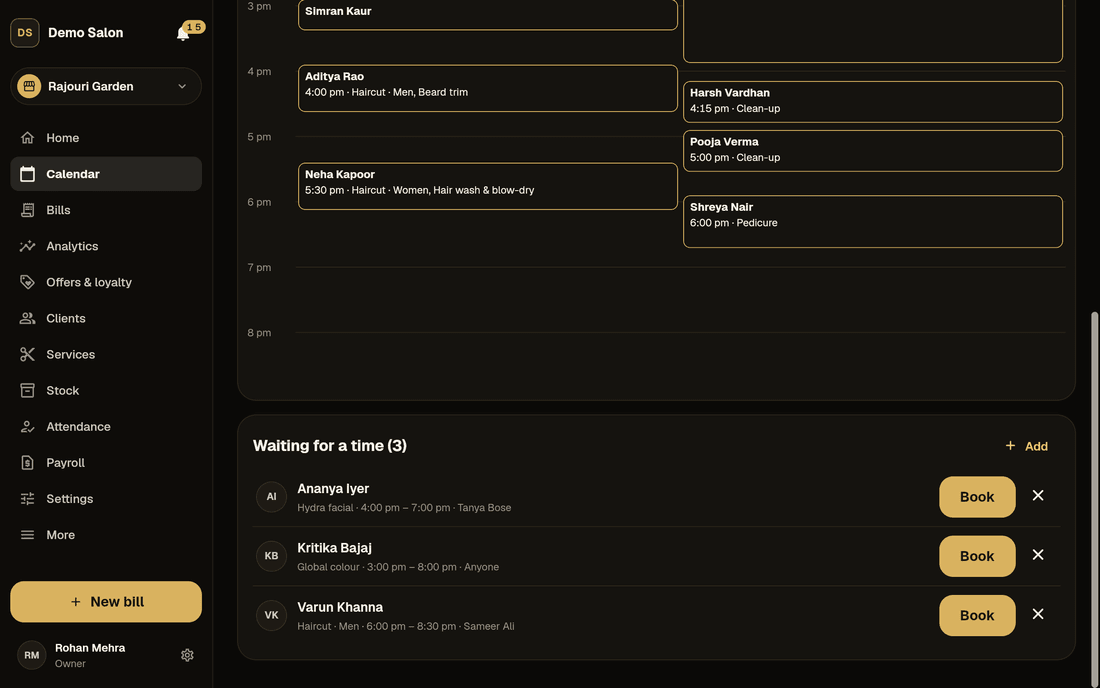
Fully booked on Saturday? Add the client to the waitlist for a day, a time range, a service and, if they like, a stylist. Clients can join from the app too.
When a time frees up, the first three clients it fits hear about it, each told once. Whoever answers first gets Book in one tap. The message is time-sensitive, so it goes at once, whatever the hour.
- By day, time range and service
- The first three who fit hear first
- Booked in one tap
Rooms and chairs · Plus
Book the spa room with the therapist, never twice
A facial needs a therapist and the spa room; a pedicure needs the pedicure chair. Add each room, chair or piece of equipment to the branch, and tick the services that need it.
From then on a service is booked only when both the person and the room are free. Clean-up time after a service keeps the room busy too, so the next client never walks into a room that is still being cleaned.
- Rooms, chairs or equipment, per branch
- Booked only when one is free
- Clean-up time counts for the room
Demo Salon, Rajouri Garden
Sample setup on demo data
Repeat and group bookings · Plus
Book a regular’s next six visits, or a whole bride party, at once
Repeat bookings
Every 1, 2, 3, 4, 6 or 8 weeks, a number of times: the weekly blow-dry or the monthly root touch-up, booked in one go. Dates that don’t fit are skipped and listed, so nobody is surprised.
Move one, or all that follow
Moving a repeat booking asks: “Just this one” or “This and all following”. The checks for a free stylist run on each date.
Group bookings
A bride party with each person’s services and stylist. Everyone is booked or nobody is, so you never end up with half a party on the calendar.
Bill the group together
When the party is done, “Bill the group together” makes one bill, with each service still carrying the stylist who did it.
Deposits and no-show fees · Plus
Stop no-shows costing you, without taking money online
Frizzi takes no money online, so a deposit works the way most Indian salons already take one: at the desk. Set when a deposit is asked: a booking over an amount (say 20% of anything over ₹2,000), a client with a number of no-shows, or a service with its own deposit. The desk taps Take deposit on the booking and takes it by cash, UPI or card. It goes into the client’s wallet, tagged to that appointment, and counts in the cash tally once, on the day it was taken. When the client arrives, “Bill now” uses it by itself.
If the client cancels in good time, the deposit simply stays in their wallet for next time. “Late” means under 4 hours’ notice unless you change it. If they cancel late or don’t come, staff choose Charge or Waive; reception can leave the choice for a manager. A late cancel made by the client in the app, or with the reminder’s Cancel button, waits for the desk to decide. The kept deposit pays the fee first; anything more comes from the wallet or becomes a due.
Each charge is income for a service the client booked, so it carries GST. A ₹525 no-show fee is ₹500 plus ₹12.50 CGST and ₹12.50 SGST, on its own numbered fee invoice (DS/F26-27/00001) that prints or shares as a PDF. Waive it in a later month and Frizzi makes a credit note. Before you switch fees on, write the rule down and tell clients: our guides on a salon cancellation policy and reducing no-shows help.
Booking reminders
Fewer empty chairs: reminders the client can answer
A client with a number hears when they are booked. The day before, a reminder comes with Confirm, Reschedule and Cancel; Confirm puts a tick on the booking in your calendar. A few hours before, a second reminder. Both are on from the start, and each goes once.
Clients with the Frizzi app (coming soon) get them in the app for free. For everyone else they go on WhatsApp once you connect your salon’s own WhatsApp Business number. Frizzi doesn’t send SMS reminders. Real WhatsApp sending hasn’t been tried with a live account yet.
- Moved bookings get new reminders
- Clients who said no to booking messages get none
- Nothing for an app booking you haven’t accepted yet
Sample day on demo data
Screen by screen
The calendar, from booking to bill
Real screens on demo data. Tap any one to see it larger.
How it works
Booking a client, step by step
The client
Search by name or number, type a new number, or just a name for a walk-in.
The services
Tap from your menu. The panel adds up the time and price: “2 services · 1 h 15 min · ₹1,800”.
Stylist and time
A named stylist or anyone free, then a free time that fits the whole visit. Book, or Seat now.
Bill now
When they’re done, the till opens with everything filled in. Then book the next visit.
FAQ
Questions
Can two people at the desk book the same slot at once?
No. The database refuses overlapping busy time for one stylist, so if two people try at the same moment, only one booking is saved and the other is told the time has gone.
Does the calendar work on a phone?
Yes. On a tablet or computer you get a time grid with a column per stylist. On a phone the day is a list with a stylist filter. It works in the browser today; the Android and iPhone apps are coming soon.
How does “anyone free” choose a stylist?
Each free time goes to the stylist with the fewest visits that day, among those who do the services and are working then. On a tie, the first by name. You can move it to someone else afterwards.
Can clients pay a deposit online?
No. Frizzi takes no online payments. The desk takes a deposit by cash, UPI or card, and it goes into the client’s wallet, ready to pay the bill when they arrive.
Can stylists see the calendar?
Stylists see their own bookings, without client phone numbers, and can block their own time. Owners, managers and reception see every stylist at their branches.
Does it handle processing time for colour?
Yes. Set processing time on the service and the stylist is free for another client while the colour develops. Clean-up time after a service keeps the stylist, and the room, busy for those minutes.
Which plan has what?
The calendar, walk-ins, blocks, service timing, anyone free, online booking rules and reminders are in every plan, from ₹99 a branch a month plus GST. The walk-in queue, waitlist, rooms, repeat and group bookings, deposits and fees come with Plus.
From the Frizzi guides
Guides on this
How to reduce no-shows at your salon
Reduce no-shows at your salon with reminders the day before and hours before, deposits for big bookings, a clear policy, a waitlist and kindness to regulars.
5 min read
Running a salonWalk-ins and appointments: how to run both without long waits
How to run walk-ins and appointments together: blocks, “anyone free”, processing and buffer time, a token queue, a waitlist and honest wait times for clients.
5 min read
Clients & loyaltyA salon cancellation policy your clients will accept
Write a salon cancellation policy clients accept: when to take a deposit, how much, a 4-hour late-cancel window, no-show fees, waivers, wording and GST on fees.
5 min read
Run your salon on Frizzi, free for 35 days
Every feature of Pro for 35 days. No card needed. Your data stays yours, and you can export it any time.
Plans from ₹99 a branch a month, plus GST. Monthly or yearly.