
Payroll & commission · Commission in every plan · payroll in Pro
Salon staff payroll and commission, worked out from the bills
Frizzi is salon staff payroll and commission software. Commission comes straight from the bills each stylist did. In Pro, salary comes from attendance, advances are taken back, and every month ends with a payslip you can print or share.
- Commission after discounts, without GST, from every bill
- Loss of pay, tips and advances on one payslip (Pro)
- Commission rates only the owner can see
In every plan
Salon staff commission software that nobody has to add up
Each service on a bill carries the person who did it. That is all Frizzi needs to work out commission, and it is in Basic.
One rate per person
Give each person their own %, or leave them on the salon default. Commission is on services after discounts and without GST, so a discount never pays the stylist more than the money that came in.
Packages and combos, handled
A haircut paid from a package is ₹0 on the bill, but the stylist still did the work: it earns at that service’s normal price at that branch, without GST. A combo’s price is shared across its services by their normal prices.
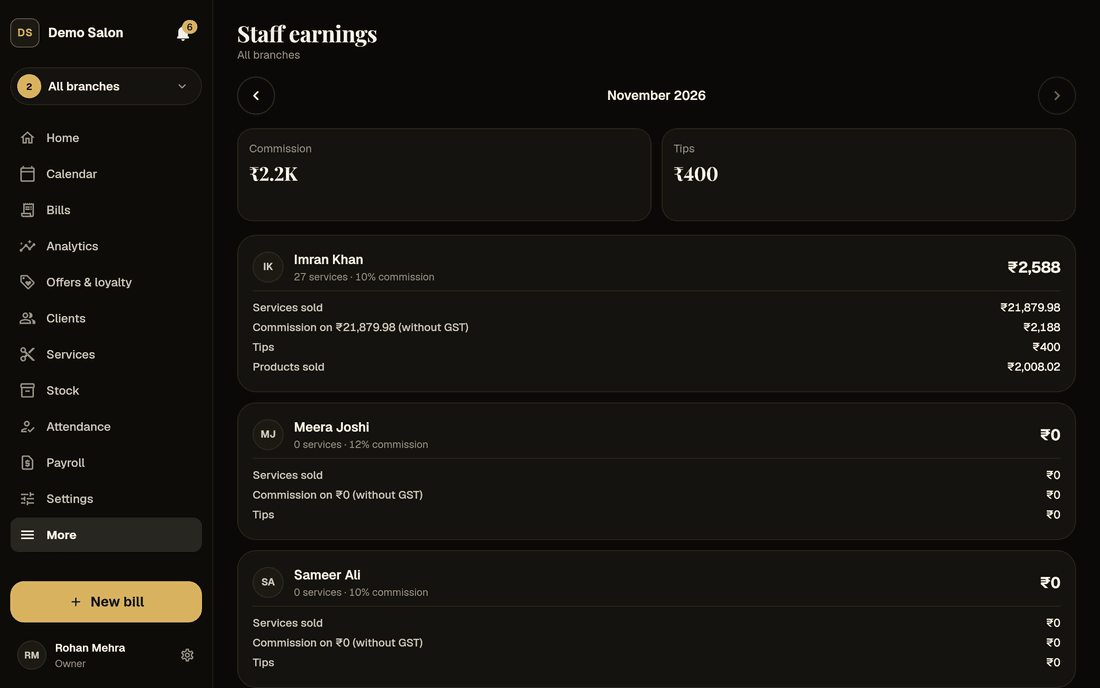
Staff earnings each month
Owners see everyone: services done, what clients paid, commission, tips and products sold, for one branch or all. Stylists see only their own month on their Home screen.
Rates stay private
Only owners set or see commission rates. Managers, reception and stylists never get a rate from the app, not even the salon default. Every change to a rate is in the audit log.
Four roles, clear limits
Owner, manager, reception and stylist. Managers look after their branches, reception bills and books, and stylists see their own work only. Stylists never see clients’ phone numbers.
Advances on the day
Give an advance from Home in cash or UPI. A cash advance comes out of that day’s cash tally, and every advance shows on the person’s earnings, so it isn’t forgotten at the month’s end.
A worked example
How a discount changes commission
A client has a ₹1,200 hair spa and you give her ₹150 off. She pays ₹1,050, which includes 5% GST, so the service brought in ₹1,000. At 10%, the stylist earns ₹100, not ₹120.
Frizzi does this on every line of every bill, so the month’s commission is ready the moment the month ends. Cancelled bills never count, and a refund takes back the commission on the part refunded. Staff earnings, payroll and profit all use the same rules, so the three never disagree.
- Services after discounts, without GST
- Cancelled and refunded parts left out
- The same figure in earnings, payroll and profit
Try the numbers
Work out one stylist’s month
Type a salary, sales and rates. This is a flat-rate sketch; Frizzi’s payroll adds attendance, slabs, targets and tips on top.
One stylist, one month
Pay for the month
A flat percentage on sales before GST. Real pay can also have targets, leave and late marks; Frizzi works commission out from the bills, and payroll (in Pro) adds attendance and advances.
See Frizzi payrollPro · pay setup
Salary, commission or both, set once per person
In Pro, each person gets one short pay form. Save it as a preset (“Senior stylist”) and the next person’s form starts from it.
| Choice | What it does | For example |
|---|---|---|
| How they are paid | Salary, Commission, or Salary + commission | Reception on salary; a senior stylist on ₹18,000 + 10% |
| Commission slabs | A higher % as service sales grow: “whole amount at the slab reached” or “each part at its own rate” | 30% up to ₹50,000 and 35% above. On ₹60,000 of services: ₹21,000 (whole amount) or ₹18,500 (each part) |
| Product commission | Its own % on products sold at the till, without GST | 5% on retail shampoo and serums |
| Guaranteed minimum | For commission-only staff: pay is topped up to this amount, less any loss of pay | A new stylist still building a clientele |
| Incentive | A monthly service-sales target that pays a bonus amount or an extra % on all service sales | ₹1,00,000 of services in the month pays a ₹2,000 bonus |
| Advance recovery | Everything from the next pay, or a monthly instalment. Never more than the pay left after other deductions | ₹2,000 a month until the advance is cleared |
Weekly offs and shifts are set with attendance, and payroll reads them from there. A preset is copied, not linked: changing it later changes nobody’s pay.
Pro · the month
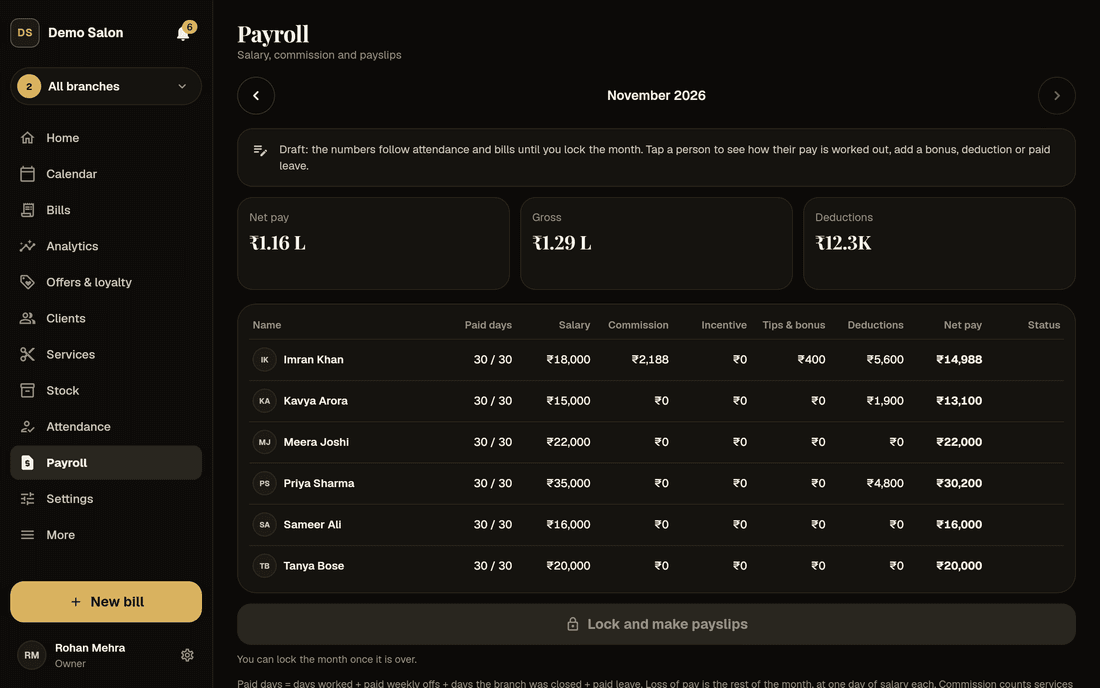
Salon payroll from attendance to payslip, with the sums shown
Loss of pay, worked out from attendance
Payroll counts paid days: days worked, paid weekly offs, days the branch was closed or on holiday, and approved paid leave. The rest of the month is loss of pay, at one day’s salary each. One day is the monthly salary ÷ the days in the month, or ÷ 30 or ÷ 26 if your salon counts that way.
Example: ₹15,000 a month, a 30-day month, Mondays off. 24 full days and a half day worked, 4 weekly offs and 1 day of paid leave make 29.5 paid days. Half a day’s loss of pay is ₹250, so the salary earned is ₹14,750.
- Late fines and half days from your attendance rules
- Tips with salary, or handed out daily
- Bonuses and deductions, each with a note
Kavya Arora · Stylist · 29.5 of 30 paid days
Sample payslip on demo data
Lock, pay, and the month stays put
Tap a person to see every line explained. Add a bonus, a deduction or paid leave, or change how much advance to take back this month (₹0 skips it). When the month is over, Lock and make payslips: advances are recovered and the payslips are made.
A locked month never changes. A bill made offline that arrives late, or one cancelled after the lock, goes on the next month as “From bill … of …”. Mark each payslip paid by cash from a branch drawer, UPI or bank, in one go or in parts.
- Cash salaries come out of that branch’s cash tally
- Payslip as PDF, print or WhatsApp
- “Part paid · ₹8,100 left” until it’s settled
Payslips made on 1 November
Sample data
Staff see their own pay, and only theirs
Everyone has My payslips, read-only. At the top, This month so far shows what they have earned, what the month should come to, fines so far, the advance that will come off, and a take-home figure, with a plain note on how it is worked out.
It cuts the “how much will I get?” questions at the counter. Staff can’t ask for an advance in the app: managers and reception record advances, and with Plus or Pro the owner can make managers’ advances wait for approval.
- Payslip in the usual Indian layout, amount in words
- Earnings beside deductions, days in full
- Nobody sees anyone else’s pay
1–18 November
Sample data · final pay is on the payslip
What Frizzi payroll doesn’t do. It doesn’t work out PF, ESI, professional tax or TDS, and it has no overtime, no leave types (casual, sick, earned) and no carry-forward: leave is paid or unpaid, with an optional yearly allowance. If your salon has statutory deductions, keep working them out with your CA and add the amount as a deduction with a note. What salon payroll in India involves.
How it works
A payroll month in four steps
Set pay once
On each person’s page: salary, commission or both, slabs, targets and how advances come back. Start from a preset.
Open Payroll
It opens on last month, worked out live from attendance and bills. Fix an attendance day and the pay changes at once.
Review and lock
Add bonuses, deductions or leave, change this month’s advance recovery, then lock. Payslips are made.
Pay and send
Mark paid by cash, UPI or bank, in parts if you like. Print the payslips, share the PDF or send them on WhatsApp.
FAQ
Questions
Is commission worked out before or after GST?
After discounts and without GST. If a client pays ₹1,050 for a service including 5% GST, the stylist’s commission is on ₹1,000. A service paid from a package counts at its normal price at that branch, without GST.
What is in Basic, and what needs Pro?
Basic (₹99 a branch a month plus GST) has one commission % per person, the Staff earnings report, roles and permissions, and recording advances. Pro (₹1,499) adds payroll: salary with loss of pay from attendance, slabs, product commission, a guaranteed minimum, targets, advance recovery, tips with salary and payslips. Every new salon gets 35 days of Pro free.
Does Frizzi handle PF, ESI, professional tax or TDS?
No. Payroll covers salary, commission, incentives, tips, fines, advances and stock shortages. Statutory deductions, overtime and leave types are not built. Keep them with your CA, and add the amount as a deduction on the payslip if you want it shown.
How are salary advances taken back?
When you lock the month, Frizzi takes back what is owed, oldest advance first: either everything from the next pay or a monthly instalment you set. It never takes more than the pay left after other deductions; the rest carries forward. For one month you can change the amount, or skip it with ₹0. Someone who leaves can pay back in cash, or the owner writes it off with a reason.
Can my stylists see what others earn?
No. A stylist sees their own month on Home and their own payslips. Managers and reception never see commission rates. Only owners see everyone’s earnings and run payroll.
How are tips paid?
Each tip on a bill names who it is for. With “Pay tips with salary” on (the default), each person’s tips go on their payslip. Switched off, the day-end cash tally takes out the day’s tips to hand over in cash. Tips are kept out of GST and out of commission.
What if a bill changes after I have locked the month?
The locked month stays exactly as it was paid. The difference goes on the person’s next open month as a line called “From bill … of …”: added for a late offline bill, taken back for a cancelled or refunded one.
From the Frizzi guides
Guides on this
Salon payroll in India: salary, commission, loss of pay and payslips
Salon payroll in India made clear: salary plus commission, loss of pay by day, advances, tips and payslips, with a worked example and where PF, ESI and TDS fit.
5 min read
Staff & payStylist commission: how to work it out, with real numbers
How to work out stylist commission: flat %, slabs, product commission, targets and minimums, on sales before GST and after discounts, with worked numbers.
5 min read
Staff & payStaff advances: how to give them, record them and get them back fairly
Staff advances in a salon without fights: clear rules, a written record, instalments never more than the pay left, write-offs and the effect on the cash drawer.
5 min read
Run your salon on Frizzi, free for 35 days
Every feature of Pro for 35 days. No card needed. Your data stays yours, and you can export it any time.
Plans from ₹99 a branch a month, plus GST. Monthly or yearly.