
Home dashboards · In every plan
A salon dashboard that opens on what matters to you
Frizzi’s salon owner dashboard puts today’s takings, every branch and everything waiting for you on one screen. Managers get the same for their branches, reception gets the day at the desk, and stylists get their own appointments and earnings. Nobody scrolls past numbers that aren’t theirs.
- 26 widgets to add, drag into place or drop in the bin
- All branches together, or one at a time
- Each person’s Home saved for them, on any device

Four Homes
Everyone starts the day on the right screen
Frizzi knows each person’s role, so the first screen after signing in fits the job. The greeting, the date and the clock sit at the top; what comes under them depends on who you are.
Owner
A board of widgets you choose, across all your branches, with quick buttons for Walk-in, Expense, Advance and Cash tally. While the salon is still being set up, a checklist of what’s left comes first.
- Starts with Today’s takings, Takings by branch, Today’s appointments and Attendance today
- Every widget is open to you, Salary this month included
Manager
The same widget board, for the branches they run. Managers add, move and remove widgets for themselves, and their numbers never include a branch they don’t cover.
- Can add Requests waiting: leave, attendance fixes and approvals
- No Salary this month widget: payroll stays with the owner
Reception
A “Today so far” card: takings, bills, clients, how people paid and the top services, against the same weekday last week up to this time. Buttons for Walk-in, Expense and Cash tally, and New bill on a phone.
- A notice when a stylist’s bill waits to be billed, or bills are saved offline
- A notice when WhatsApp messages wait on the desk list
Stylist
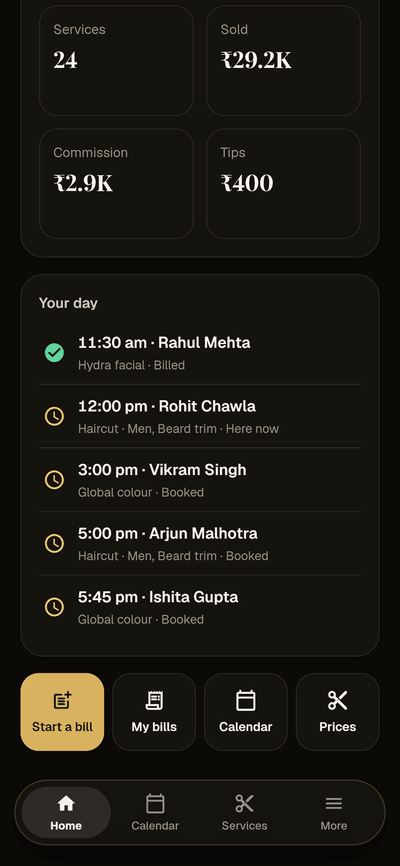
Their check-in card, “Your day” with their own appointments, and their earnings this month. Buttons for Calendar and Prices, plus Start a bill and My bills when bill approval is on (Plus).
- Never the salon’s takings or another stylist’s numbers
- No client phone numbers anywhere
See it
Four roles, four different first screens
Real Frizzi screens on sample data. Tap any of them to see it larger.
Widgets
Choose the numbers you want to see first thing
Tap Widgets, then tap one to add it, or hold it and drag it to its place. Hold a widget on Home to move it; drop it on the bin at the bottom to take it off, with Undo. Each person’s Home is saved on the server, so it is the same on the desk computer and on your phone. Tap any widget to open the page behind it (the full analytics dashboard and most reports come with Plus).
Money: 10 widgets
- Today’s takings: bills and the average bill, against last week
- Takings by branch, split by how clients paid
- How clients paid: cash, UPI, card and the rest
- Expected this month: earned so far, where the month is heading, bookings ahead
- Takings trend: the last 7 or 30 days against the days before
- Profit this month, and Today’s profit
- Expenses this month, biggest heads first
- Cash drawer: what should be in each drawer now, and whether it was counted
- Dues: money clients still owe, and who owes most
Appointments: 4 widgets
- Today’s appointments: how many, who is next, app bookings to accept
- Walk-in queue: who is waiting now, and the waitlist (Plus)
- Busy hours by weekday and hour, over the last 4 weeks
- No-shows: appointments missed or called off this month
Team: 5 widgets
- Attendance today: who is in, late, not in yet, on leave or off
- Salary this month: staff pay so far, and where payroll stands (owners)
- Advances owed: what staff still owe
- Top stylists: who brought in most this month
- Requests waiting: leave, attendance fixes and approvals to answer
Clients and business: 7 widgets
- New and returning clients, and walk-ins, this month
- Birthdays in the next 7 days
- Reviews: the average, the latest, and ones to reply to
- Top services this month
- Low stock, to order in time
- Packages and vouchers sold this month (Plus)
- Branch comparison: every branch side by side, once you have two
For stylists
Stylists see their own day, and what they’ve earned
A stylist opens Frizzi on their phone and sees what they need before the first client: a one-tap check-in, Your day with each of today’s appointments (time, client and services, with a tick once done) and Your earnings for the month so far: services done, what they sold, commission and tips.
It answers “how much have I made this month?” without anyone opening a register, and it never shows another stylist’s figures or a client’s phone number. With payroll on Pro they also see their own payslips. There is no separate staff app to install: it is the same Frizzi Business app, showing a stylist’s screens.
- Check in and out from the Home card
- Today’s appointments; tap one for details
- Commission and tips this month
Many branches
Every branch on one salon owner dashboard
Owners see all their branches added together, or pick one with the branch switcher at the top and every widget follows. Takings by branch splits each one by cash, UPI and card, Branch comparison puts the month side by side, and Cash drawer shows what should be in each drawer and whether it has been counted.
Managers see the same for the branches they run, and only those. A salon with one branch never sees a branch choice at all.
- “All branches” or one, at the top
- Branch comparison appears once you have two
- Managers limited to their branches
Sample data
The bell
Hear about what needs you, as it happens
The bell on Home (in the sidebar on a computer) shows each person their own notifications. Tap one to open it: a booking, the approvals list, a payslip. While the app is open the count refreshes by itself every minute, on any device. Push alerts to your phone are built but not switched on yet; they arrive with the Android and iPhone apps, which are coming soon.
Waiting for you
A stylist’s bill to approve goes to the desk and managers. A manager’s advance or a big stock write-off goes to the owner.
New app bookings
The desk and managers of that branch hear when a client books in the Frizzi app, or a booking waits to be accepted.
Leave and attendance
Managers and the owner hear about leave requests and check-ins to fix. The person who asked hears the answer.
Money alerts and day end
Owners hear about cancelled bills, refunds, big discounts and short counts. Owners and managers get the day-end summary 30 minutes after closing.
Low stock and payslips
Low stock once a day at 9:30 am per branch, not after every sale. Each person hears when their payslip is ready (Pro).
Unhappy clients
A 1 or 2 star private feedback score reaches the owner at once, with the stars and the comment.
How it works
Make Home yours in a minute
Open Home
Sign in and Home opens by itself. Owners and managers start with four widgets.
Tap Widgets
The panel lists every widget you can have, in four groups, each with a small picture of what it shows.
Add and arrange
Tap one to add it, or hold and drag it into place. Hold a widget on Home to move it.
Take one off
Drop it on the bin at the bottom of Home. Changed your mind? Tap Undo.
FAQ
Questions
Can every staff member choose their own widgets?
Owners and managers choose their own, and each person’s Home is saved separately. Reception and stylists get a fixed Home made for their job, so there is nothing for them to set up.
Can reception see how much the salon took today?
Reception sees today so far for their branch on Home (takings, bills and how clients paid) because they run the counter. They don’t see reports, profit or other branches. Stylists see only their own earnings.
Does the dashboard show all my branches?
Yes. Owners see every branch added together, or one at a time with the switcher at the top. Branch comparison appears once you have two or more. Managers see only the branches they run.
Will I get alerts on my phone?
Every notification lands under the bell, on any device, the browser included. Push alerts to your phone are built in but not switched on yet; they start with the Android and iPhone apps, which are coming soon. The person who did something is never alerted about it.
Is the dashboard in every plan?
Yes. Home and its widgets are in Basic (₹99 a branch a month plus GST). Two widgets need Plus: Walk-in queue, and Packages and vouchers. Some widgets open the analytics dashboard or a report when tapped: Basic keeps the daily sales and GST reports, and the full analytics dashboard and every other report come with Plus.
Does it work on a phone?
Yes. On a phone the widgets sit in one column and the Widgets button is beside the branch name. On a tablet or computer they sit in two or three columns, with charts taking two.
From the Frizzi guides
Guides on this
Salon reports to check weekly: the 10 numbers that matter
Salon reports to check weekly: takings, average bill, services per bill, came-back %, rebooking, no-shows, discounts, cash short/over, product and staff sales.
5 min read
Running a salonOpening a second branch: what to set up before the doors open
Opening a second salon branch: what to share and what to keep apart, from clients, menu and branch prices to staff, cash drawers, stock, managers and reports.
5 min read
Money & the counterClosing the day: a salon cash tally routine that works
Closing the day at a salon: work out expected cash, count note by note, record short or over, log payouts and bank deposits, and act on repeat shortages.
5 min read
Run your salon on Frizzi, free for 35 days
Every feature of Pro for 35 days. No card needed. Your data stays yours, and you can export it any time.
Plans from ₹99 a branch a month, plus GST. Monthly or yearly.